

A real website redesign project plan needs five things: measurable goals, a defined scope, a timeline, named owners, and a risk register. Most templates online cover the first two well and go generic on the last three, which is exactly where real projects actually slip.
Setting Goals You Can Actually Measure
"Improve the website" is not a goal. It cannot be checked off. It cannot be argued with either, which is why so many redesigns end in a disagreement about whether they worked at all. A real goal names a metric and a number: Falcon Ridge's goal was more organic traffic and more enquiries for a 55+ living community. It got 285% more traffic and 60% more enquiries. Carter Hearing's goal was more booked appointments through local search, and it got 180% more traffic with zero ranking loss through the platform migration. Write your goal the same way: one sentence, one metric, one number you will check against Search Console's own performance data after launch.
Scope: What Goes In, What Stays Out
Scope creep is the single most common reason a plan falls apart mid-project. Define page count and features before design starts, not during it. Our own plan template ties scope directly to a published tier, so there is no ambiguity later about what was agreed:
- Starter: Up to 5 responsive pages, mobile-friendly design, 1 round of revisions.
- Professional: Up to 10 responsive pages, advanced seo + schema markup, 2 rounds of revisions.
- Enterprise: 15+ pages (or unlimited), e-commerce / woocommerce ready, unlimited revisions.
Anything requested outside that list is a scope change, not a free addition, and it gets a number attached before it gets built, not after. This is the single line most plans leave vague, and it is exactly the line that turns "just one more page" requests into an argument three weeks before launch.
The Timeline Section of Your Plan
A timeline that only names a launch date is not a timeline, it is a guess. Our full phase-by-phase breakdown covers discovery, information architecture, design, development, content and QA, and launch, with a real delivery window for each. Put dates against each of those six phases in your own plan, not just one date at the end. A plan with six checkpoints catches a slipping project weeks earlier than a plan with one.
Who Owns What
Every real plan names a person, not a department, against every phase. On our side, one person, the developer actually writing the code, owns the build from discovery through launch. That is a deliberate choice. A plan that routes decisions through an account manager before they reach whoever is building the site adds a step that only slows approvals down. On your side, name one decision-maker who can approve a design or a piece of copy without a second round of internal sign-off. A plan with two approvers is a plan with double the delay, and neither one ends up feeling fully responsible for the result.
Budget: Tie the Plan to a Real Number
A plan without a fixed number attached is not a budget, it is a hope. Full pricing by tier, including exactly what drives it up or down, is in our website redesign cost breakdown. Put that number in your plan document itself, agreed in writing before work starts. Do not leave it as a line item to negotiate once the project is already underway, since that is exactly when it costs the most to renegotiate.
The Risk Register Nobody Writes
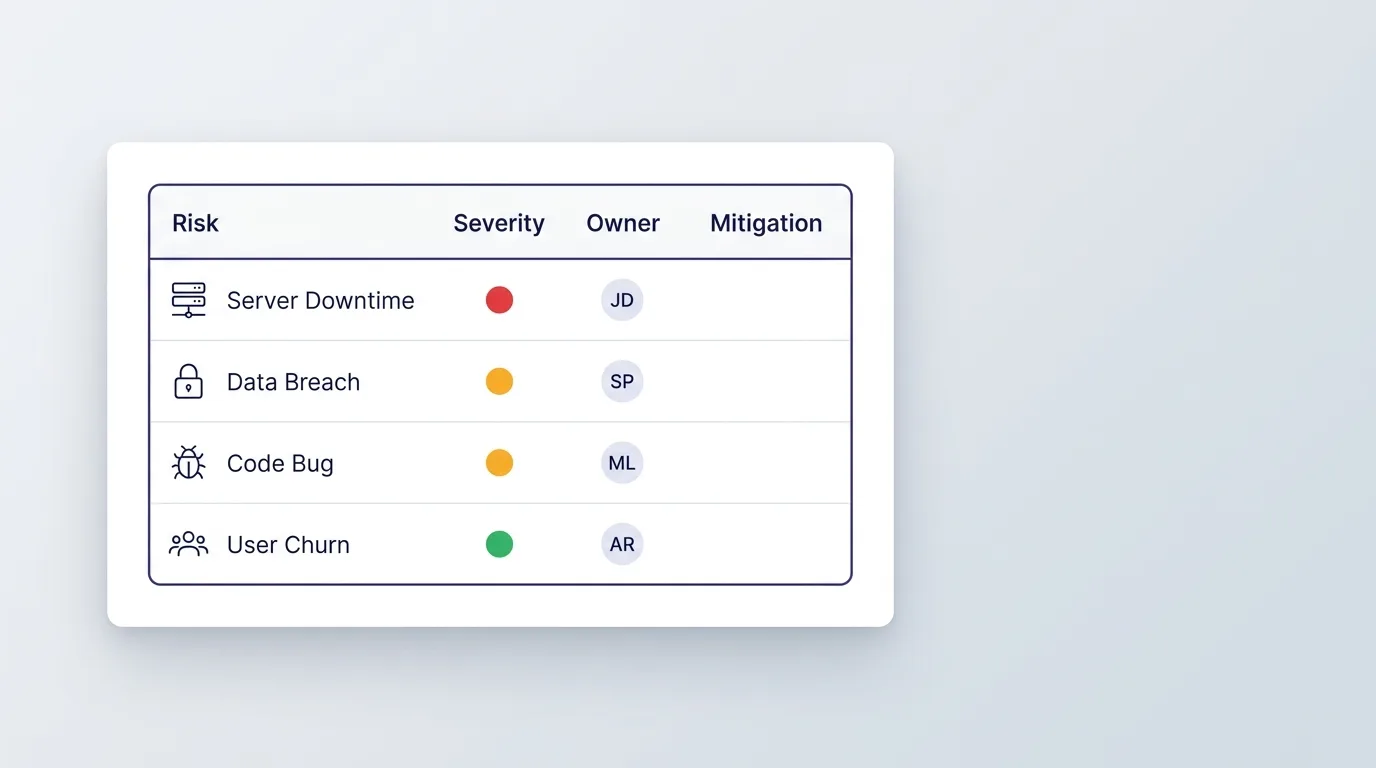
Most templates skip this section entirely, and it is the one that actually predicts delays. Three risks show up in nearly every real project: content that is not ready when development needs it, a redirect map that gets built after launch instead of before it, and a decision-maker who is unavailable during a review week. The redirect risk is the one Google's own site-move documentation treats as non-negotiable: every URL that changes needs a mapped redirect before launch, not a fix applied after rankings have already dropped. Name these three in your own plan before they happen, with a real owner and a real fallback for each, not after they have already cost you a week.
Build In a Real Contingency Buffer
Large IT projects run 45% over budget on average, according to McKinsey and Oxford's joint research across more than 5,400 IT projects. A website redesign is far smaller than the multi-million-dollar projects that study covers, but the same forces apply: scope creep, slow approvals, and content that was never actually ready. Build a 15 to 20% contingency into the overall budget from the start, and 3 to 5 business days of buffer between each phase for feedback and sign-off, rather than assuming every phase hands off to the next one instantly. A plan with buffer built in absorbs a slow week without becoming a missed launch date. A plan without one turns every small delay into a renegotiation.
The Retrospective Most Plans Skip
A plan does not end at launch. Hold a real retrospective 30 to 60 days after, checking the finished project against the goal written in the first section of this plan, not a general impression of how it went. Three columns cover it: what worked, what did not, and what to change next time. Redesigns rarely fail because they were built badly. They fail after launch because nobody kept watching once the project officially ended. A retrospective is how a plan stays a living document instead of paperwork filed away the day the site goes live.
A Real Plan, Executed
Falcon Ridge's plan covered three property locations, a hand-coded WordPress build, and a hard requirement to keep the existing local SEO intact through the move. Local SEO was named as a risk before the project started, not discovered as a problem after launch, because the old site's schema markup and Google Business Profile setup were both worth preserving deliberately rather than by accident. It shipped in 6 weeks, on the goal it was written against. That is what a plan with real goals, real scope, and real owners is for. It is not paperwork. It is a record you can check the finished project against once it is done.

For the checklist that runs alongside this plan during execution, see the complete website redesign checklist.