
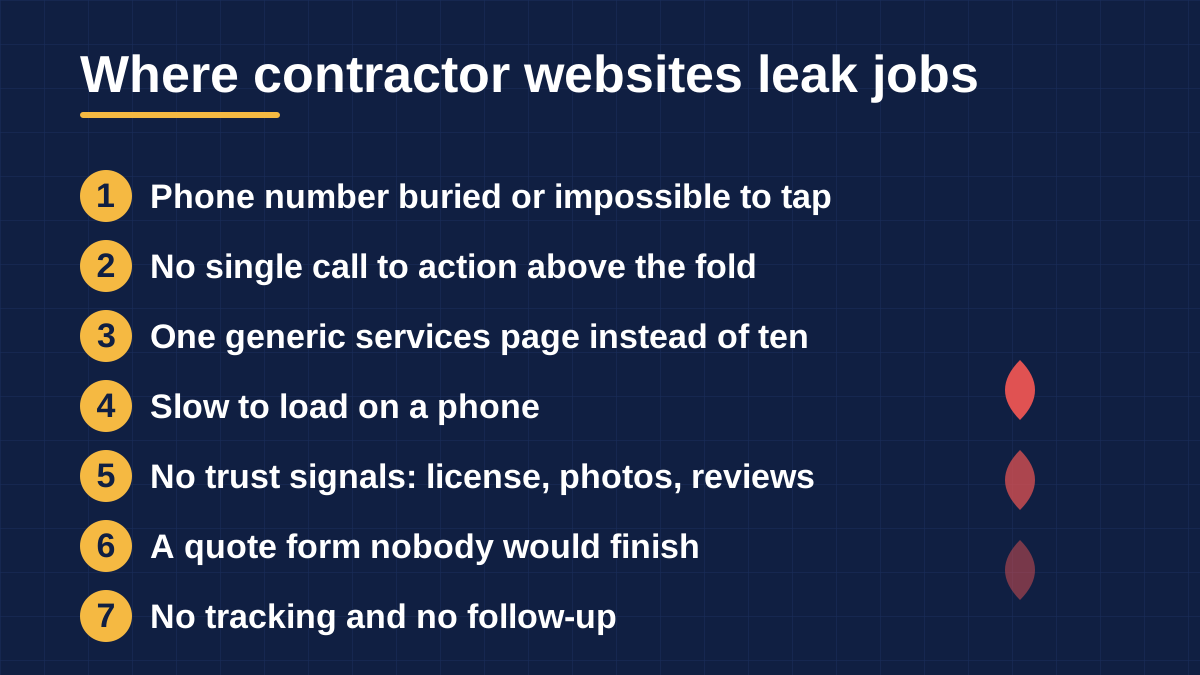
The 7 contractor website mistakes that cost the most jobs are a buried or untappable phone number, no single call to action above the fold, and one generic services page instead of a page per service. Add a site that loads slowly on a phone, missing trust signals like license details and real photos, a quote form nobody would finish, and no tracking or follow-up behind the form. Every one of them is fixable without a full redesign. Every one of them is invisible to an owner who only checks the site on a desktop.
Most contractor websites do not look broken. That is what makes these mistakes expensive. The site loads, the logo is there, the colors match the trucks. Meanwhile a homeowner with a burst pipe opens it on a phone, cannot tap the number, waits 4 seconds for the photos to load, and calls the next company. I am Habib Ahmed, founder and lead developer at Websloop, and I have been building contractor websites since 2015. We build them for a living, and we audit them even more often. The 7 below are the ones we find again and again, with the 60-second test that exposes each one.
Put a number on it before you dismiss it. Roundhouse, a contractor marketing agency, walks through the math. At a $5,000 average job, losing one qualified lead a month to website friction is $60,000 a year in missed revenue. (Roundhouse) That is 1 lost call a month. Most of the sites we audit are losing more than that.
Mistake 1: Your phone number is buried or impossible to tap
This is the single most common lead leak we find, and the cheapest to fix. The symptoms are easy to spot. The number sits in the footer only, or appears once on the contact page. Sometimes it is an image of a number instead of a link, so a phone cannot dial it. Sometimes it is printed so small that nobody over forty can read it on a phone. Sleek Web Designs lists exactly this at the top of its contractor checklist: the phone number is small, not clickable, or only on the contact page. (Sleek Web Designs)
Think about who is visiting. A large share of home service searches happen on mobile, and the person searching is often standing next to whatever broke. They do not want to hunt. They want to tap once and talk to a human. If the number is an image, a phone cannot dial it. If it is buried in a menu, a thumb on a tight schedule will not find it. Every extra step between "I need a plumber" and a ringing phone is a step where your competitor gets the call.
The 60-second test: open your own site on your phone right now. Can you start a call in one tap without scrolling? If not, you are losing calls from people who wanted to make one.
The fix takes an afternoon. Put the number in the header as a real tap-to-call link on every page. Add a sticky call button that stays visible on mobile while the visitor scrolls. Keep the number in the footer too, written out in plain text so search engines can read it. Then call it yourself from 2 different phones and confirm it rings.
Mistake 2: No single call to action above the fold
The second mistake is the cousin of the first: the site asks the visitor to do everything at once. "Call Now," "Request a Quote," "Contact Us," "Get a Free Estimate," "Book Online," all competing on the same screen. The AN17 revenue-leak analysis describes this well: multiple competing buttons create confusion. When a homeowner lands on the site in an urgent situation, an unclear path to contact sends them to the next company. (AN17)
A visitor should know within 5 seconds what you want them to do. The right answer depends on the trade. Emergency work (plumbing, HVAC, electrical) should push the call: the money is in the ringing phone. Project work (roofing replacement, remodeling, additions) should push the quote or inspection form: the money is in the booked appointment. Pick the action that matches how your jobs actually start, make it the dominant button, use the same words everywhere, and demote everything else to plain links.
The 60-second test: open your homepage and count the different things it asks a visitor to do before scrolling. If you need more than one hand, pick a winner.
The fix is one primary button per page, labeled with the outcome ("Get My Free Quote," "Call for 24/7 Service"). Repeat it in the same words down the page and in the sticky mobile bar. Everything else becomes a text link. Conversion work is mostly subtraction.
Mistake 3: One generic services page doing the work of ten
In short: one "Services" page listing every service ranks for none of them, because Google ranks pages and each service is a different search. Give every service its own page, and name your real towns in plain text instead of publishing name-swapped duplicate town pages.
This is the most common structural failure we see, and the most expensive to leave in place. The site has one "Services" page listing everything: drain cleaning, water heaters, boiler repair, emergency callouts. One page listing four different searches ranks properly for none of them, because each is a different search with different intent and different competitors.
Google ranks pages, not websites. A homeowner searching "water heater replacement" wants a page about water heater replacement: what it costs, how long it takes, the brands you install, photos of your installs. A page that mentions water heaters in one bullet point cannot compete with a competitor's full page on the topic. Writing is the slow part of a build, which is why cheap builds skip it, and skipping it is why those sites never rank beyond their own company name.
The town-page trap inside mistake 3
The town side of this mistake is just as common. Either the site never names the towns it serves, which leaves both Google and the homeowner guessing. Or it has a dozen pages that are identical except for the town name swapped in. The first version cannot rank for "roofer in Plano" because it never says Plano. The second version is worse: pages built only by swapping a town name read as filler to Google and can drag the whole site down. Google's own spam policies call this doorway abuse, and it is worse than having no town pages at all. (Google Search Central)
A town page earns its keep only when it says something true about that town: the housing stock, the common jobs there, a review from a customer in that town. The 60-second test: search your company name plus one service ("acme plumbing water heater replacement"). If no page on your site could plausibly rank for that search, your services page is a brochure, not a ranking asset.
The fix: give every service that should rank its own page with real copy, photos, and a clear call to action. Name the cities and counties you actually serve in plain text on the page, not only inside a map widget a search engine cannot read. ProLicensed's lead-generation guide puts it well: this is a ten-minute fix per town and it is regularly the difference between a visit and a call. (ProLicensed)
Mistake 4: Slow on a phone
Speed is the mistake owners feel last, because they check the site on office wifi on a desktop. Their customers check it on mobile data in a driveway. Google's own mobile research found that 53% of mobile site visits are abandoned when a page takes longer than three seconds to load. (Fusion Marketing, citing Google) A one-second delay in mobile load time can cut conversion rates by up to 20%.
The usual culprits are unglamorous. Photos uploaded straight from a phone camera roll at 4 or 5 MB each. A homepage slider with five of those. A video background. Cheap shared hosting. A DIY builder template dragging in scripts for features nobody uses. None of this is visible on a fast connection, which is exactly why it survives for years.
The 60-second test: run your homepage through Google PageSpeed Insights (it is free) and look at the mobile score, not the desktop one. If the largest contentful paint is over four seconds on mobile, you have a speed problem no redesign will fix until the weight comes off.
The fix, in order of impact: compress every image (modern formats, sized to how they display). Delete the slider and keep one strong hero image. Drop the video background. Move off bargain hosting if the server response itself is slow. A plain fast site beats a beautiful slow one on a phone every time.
Mistake 5: No trust signals
In short: a homeowner is inviting a stranger into their house for a 4 or 5 figure job, and your site has about 10 seconds to prove you are legitimate. Show your license number, real crew and job photos, and real reviews. Hide them and the visitor calls someone who shows theirs.
Most contractor sites fail that test. The license number is nowhere on the site. The photos are stock: a smiling model in a hard hat who has never held a wrench. Reviews exist on Google but never appear on the website. The "latest news" section has 1 post from 2 years ago, which reads as "possibly out of business."
ProWeb365's trust-signal research names hiding license information as the largest red flag of all, because it makes visitors wonder whether the work is even legal. (ProWeb365) It also calls out model photos, because homeowners can tell when a photo is fake. The breakdown at Nexus Growth Engine rates missing trust signals as critical for plumbers and roofers, because homeowners verify licensing before calling and roofing is a major investment. (Nexus Growth Engine)
The 60-second test: open your homepage and pretend you have never heard of your company. Can you find a license number, a real photo of your crew or your work, and a review with a real customer name? All without scrolling past the first screen or two? If not, a stranger is taking your word for everything, and strangers do not.
The fix starts with the license number in the footer of every page. Replace stock photos with real ones: your trucks, your crew, before-and-after shots of actual jobs. Pull your Google reviews onto the homepage and key service pages. Delete the dead news section or update it.
Match your Google Business Profile, too
The hours and phone number on the website do not match the Google Business Profile on many contractor sites we audit. That mismatch costs map rankings, because Google trusts consistent business information. Open your profile and make the name, phone, hours, and service area match the website exactly. Then keep them in sync: every time one changes, change both the same day. Review recency matters as well, so build a review request into your post-job routine and answer every review you get.
Mistake 6: A quote form that asks for everything and converts nothing
In short: a 12-field quote form on a phone converts almost nobody, and a form nobody tests may be silently broken. Cut it to 4 or 5 fields, ask 1 or 2 qualifying questions instead of a blank message box, and test it from a real phone every month.
Long forms are where interested visitors go to die. The classic contractor quote form asks for name, email, phone, address, city, zip, service needed, preferred date, preferred time, how you heard about us, and a message box, all required. On a phone. At 9 pm. Nobody finishes that except the extremely patient, and the extremely patient are not your typical emergency caller.
Then there is the quieter version of this mistake: the form looks fine and silently fails. It submits to an inbox nobody checks, or to an address that routes to spam, or it breaks on one phone browser and nobody ever tests it. Lightly Coded's contractor checklist calls the untested contact form the single most common lead leak they find, and their advice is blunt: test yours from a phone right now. (Lightly Coded)
Ask qualifying questions, not just name and message
There is a third layer most owners never consider: the form asks for nothing useful. The standard name, email, and message box comes back with "my AC isn't working, can someone come out," which tells you nothing you can price, schedule, or prioritize. ProLicensed flags this well: you burn a callback just to learn the job was never real. (ProLicensed) A good form asks 2 or 3 qualifying questions (what is broken, where, when do you need it) so the lead arrives sortable. That one change can be the difference between a lead list and a callback list.
The 60-second test: fill out your own quote form on your phone, end to end, and time it. If it takes more than a minute, or if the confirmation never arrives, you have found the leak.
The fix: cut the form to 4 or 5 fields. Ask 1 or 2 qualifying questions instead of a blank message box. Test it monthly from a real phone. Add an instant confirmation ("we reply within 15 minutes during business hours") so the visitor knows the message landed, and route submissions somewhere a human actually watches.
Mistake 7: No tracking, no follow-up, no idea what works
This is the mistake that makes all the others permanent. Nearly half of small business owners do not know whether their marketing is working, according to a PostcardMania survey cited by Roundhouse. (Roundhouse) No call tracking, no analytics, no record of which page produced which lead. The owner is deciding on gut feel: "the website seems slow this month." You cannot fix what you cannot see, so nothing gets fixed.
The follow-up half is worse, because it wastes leads you already paid to win. Studies consistently show that businesses responding to inquiries within minutes dramatically increase their chance of securing the job. (AN17) Yet many contractors still run manual follow-up. The form email sits in an inbox, gets buried, or goes unanswered for days.
The homeowner does not wait. They called three companies, and the first one back usually gets the job.
The 60-second test: can you answer "which page generated our last five leads" without guessing? If not, you are flying blind.
The fix is mostly free. Put Google Analytics and Google Search Console on the site (both free) and check which pages bring calls. Use a call tracking number so phone leads are counted like form leads. Add an automatic text reply to every form submission ("Thanks, we will call you within 15 minutes") so no lead sits silent. Then set the one rule that matters: every inquiry gets a human response within 5 minutes during working hours. Speed is the cheapest conversion tool a contractor has.
The 60-second self-audit
Run these 7 checks on your phone, in order. Each "no" is a leak with the fix described above.
- Is the phone number one tap away, without scrolling?
- Does the homepage ask for one clear action above the fold?
- Is there a dedicated page for every service you want to rank for?
- Will the homepage load in under 3 seconds on mobile data?
- Would a stranger find your license number, real photos, and reviews within seconds?
- How long does your own quote form take on a phone?
- Do you know which page produced your last five leads?
If you answered no more than twice, your site is in decent shape and the fixes are afternoon work. If half of these failed, patching one at a time will take months, which is when a rebuild starts to make sense. Our contractor sites start at $799 with tap-to-call, quote forms, service and town page structure, and analytics wired in from day one. The full pricing is published on our pricing page. If you want a second pair of eyes first, our free website review looks at all 7 of these on your live site and tells you which one is costing you the most. Start with the review or get a quote here.
For the cost side of the decision, our contractor website pricing guide breaks down what each type of build should cost in 2026. Our plumbing website cost breakdown covers trade-specific pricing with our own fixed prices published in full.