An SEO migration is any change to a site's URLs, domain, platform, or structure that puts existing search rankings at risk. Redesigns are the most common trigger, but a migration and a redesign are not the same project. You can redesign a site with zero migration risk by keeping every URL identical. You can also run a pure migration, moving platforms or domains with the visual design untouched, and it carries the same risk either way. This is the checklist for the migration itself: the URL mapping, the redirect logic, the domain-level decisions, and the monitoring that decides whether rankings transfer or reset to zero. If your domain is staying exactly where it is and you are only changing servers, see how to move WordPress to a new host instead. That is a lower-risk, more mechanical process than what follows here. Not sure which type applies to your situation? See the four types of website migration compared side by side.
What Counts as an SEO Migration
Four situations create real migration risk, and each one needs a slightly different checklist. A platform migration moves the site's engine, WordPress to Shopify or Wix to WordPress, for example. It usually changes URL patterns even when nobody intends it to, since different platforms generate slugs differently by default.
The domain migration is the highest-risk category. It changes the address itself, and every external backlink still points at the old domain, so Google has to re-associate that authority with a new hostname. A URL restructure is quieter but just as risky: the platform and domain stay the same, only the path pattern changes, /blog/post-name to /articles/post-name for instance. That is easy to underestimate, because nothing about the site looks different.
Last is the protocol or subdomain change, HTTP to HTTPS or www to non-www. It is the lowest-risk category of the four, but it still needs its own redirect rule, or duplicate, competing versions of every page end up sitting in the index at once. A redesign can trigger any combination of these four, or none of them. That is the whole reason this checklist exists separately from general redesign advice: the migration risk lives in these four mechanics, not in how the new design looks.
Before You Touch Anything: The Pre-Migration Audit
Every migration checklist that actually works starts before any development happens. Crawl the existing site in full and export the list: every URL, its title tag, its meta description, and its canonical tag. Add its current organic traffic and backlink count too, if you can pull it. This becomes the baseline you compare against after launch, and it is also the source list for the URL map in the next step. Skipping this step is the single most common reason a "successful" migration turns out to have quietly dropped forty forgotten category pages that nobody remembered to map.
Document current rankings for your highest-value pages specifically, not just sitewide traffic. A sitewide average can look completely calm for weeks while the three pages that actually generate leads have already dropped out of the index. Tracking the aggregate number hides exactly the failure you are trying to catch.
URL Mapping and the 301 Redirect Rule
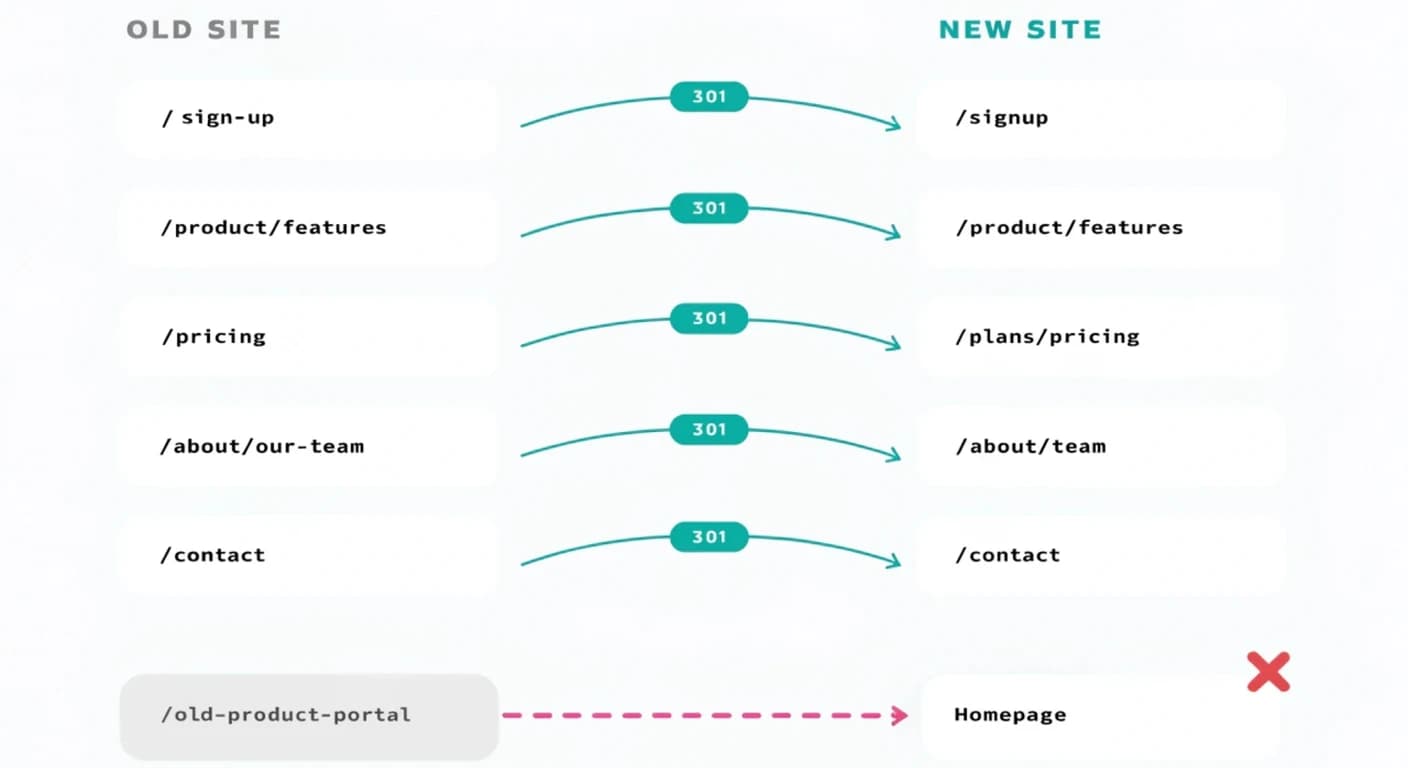
Every URL that currently exists needs a documented destination on the new site, mapped one to one before development starts, not improvised at launch. A 301 redirect, never a 302, tells search engines the move is permanent and passes the old page's accumulated ranking signal to its replacement, per Google's own redirects documentation. A 302 signals a temporary move, so it passes authority poorly and leaves the old URL competing with the new one in the index instead of being replaced by it. The only legitimate use for a 302 is a genuinely temporary situation, like a short maintenance window, not a permanent site change.
The map needs to cover more than the pages in your main navigation. Blog posts, pagination, category and tag archives, and any media file URL that carries inbound links all need their own entry. A map that only handles what is visible in the header menu misses the long tail. That long tail is usually where the bulk of a site's accumulated ranking equity actually sits, spread across dozens of smaller pages rather than concentrated in the five main ones.
The Redirect Mistake That Costs the Most Rankings
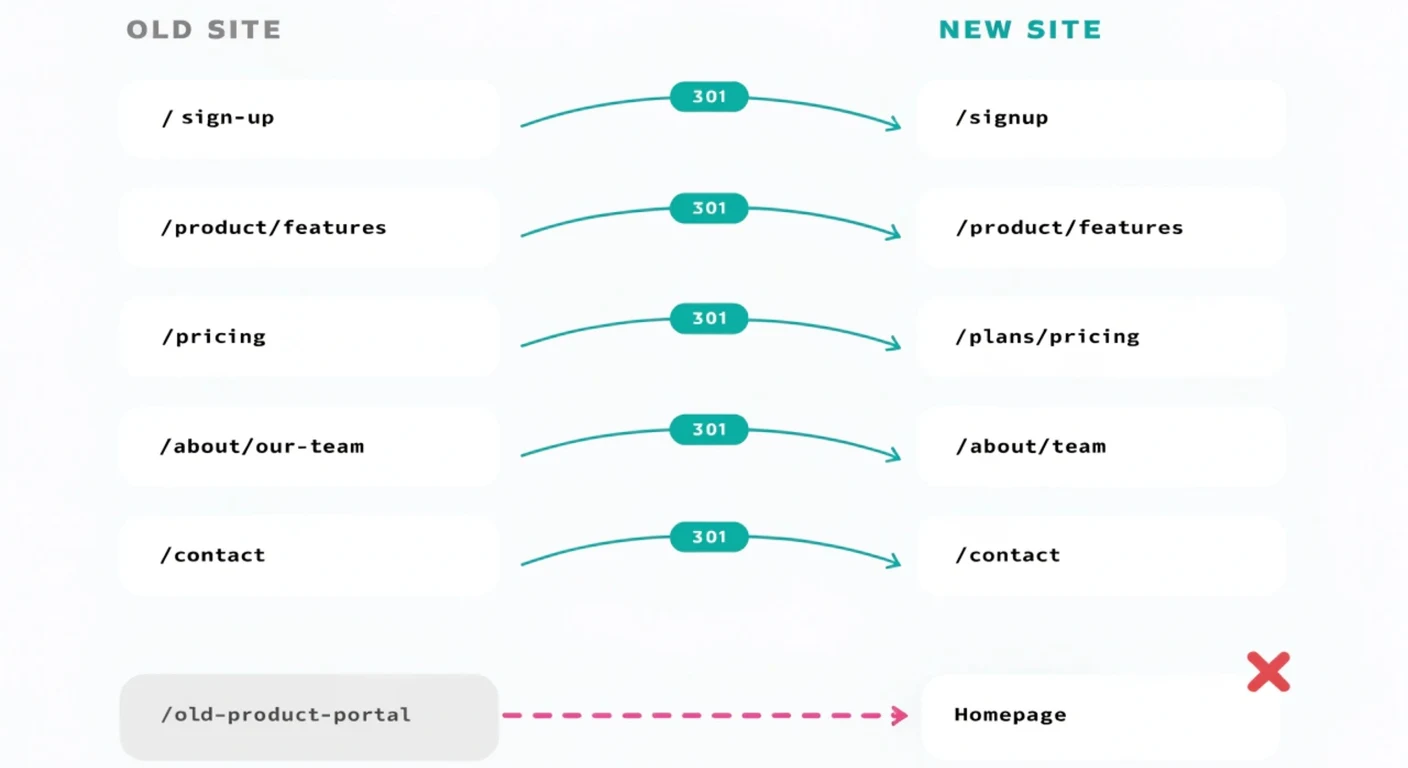
Mass-redirecting every old URL to the new homepage is the single most damaging migration mistake. It is also the most tempting shortcut when a deadline is close. Search engines treat a flood of unrelated pages all redirecting to one destination as a signal of a soft 404, not a genuine one-to-one move. They discard the old pages' authority instead of passing it forward.
We have made this exact mistake ourselves on an early migration, before this checklist existed in its current form. A batch of old URLs got redirected to the homepage instead of their closest equivalent. It cost 144 impressions and every click those pages would have earned, visible in Search Console within the following reporting cycle. Every old URL needs its closest content and intent match on the new site, even when that means more mapping work up front than a blanket redirect would.
Domain-Level vs Path-Level Migrations, and Google's Change of Address Tool
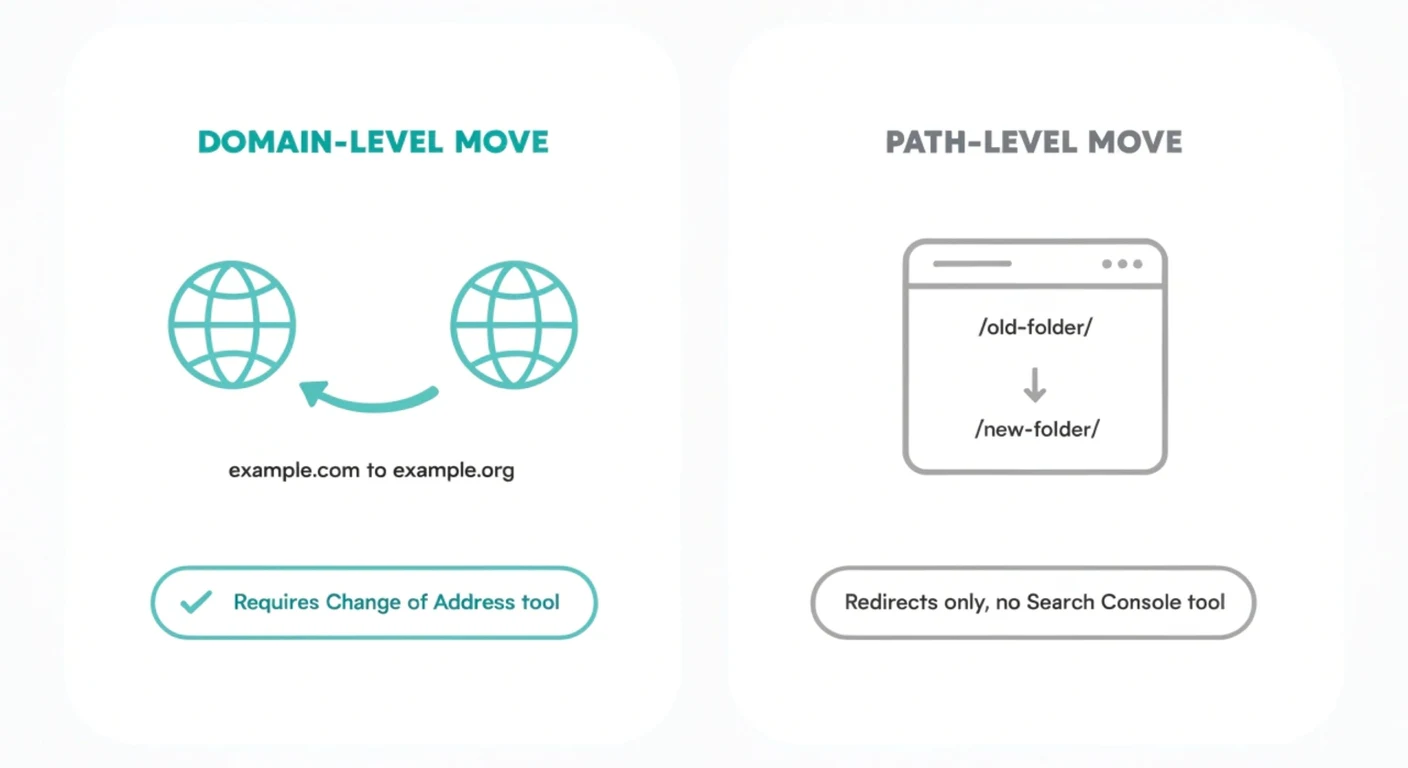
Google's own Change of Address tool documentation is specific about scope, and the distinction trips up a lot of otherwise well-planned migrations. The tool operates exclusively at the domain level. Moving example.com to example.org qualifies, but restructuring URLs within the same domain does not, and neither does an HTTP-to-HTTPS change or a www to non-www switch.
Critically, the tool does not automatically cover subdomains, including www, below the domain you specify. If your migration touches multiple verified properties in Search Console, www, non-www, and any language or regional subdomains, each one needs its own Change of Address submission. One submission does not cover all of them.
Search Engine Journal reported that Google has tightened its domain-migration requirements further in 2026. That is consistent with what we see in practice. Google is getting less forgiving of loosely executed domain moves over time, not more. A domain migration attempted without the Change of Address tool and a complete redirect map carries more risk now than it did even a year or two ago.
Staging: Testing the Migration Before It Is Live
A staging environment is a private copy of the new site, blocked from search engine crawling, where the full redirect map gets tested before the live domain ever changes. This is where you crawl the complete list of old URLs against the staging build and confirm each one resolves to its intended destination in a single hop. Automated crawling catches most problems, but check a representative sample manually as well. Crawlers reliably miss context errors, a redirect that technically resolves but lands on the wrong page entirely. Testing on staging means you are preventing problems before launch. Testing after launch means you are diagnosing damage that is already live and already being re-crawled. See the full website redesign checklist for everything else that needs verifying on staging beyond just redirects.
Redirect Chains: The Silent Authority Killer
A redirect chain happens when an old URL redirects to a second URL, which itself redirects to a third one, rather than pointing straight at the final destination. Each additional hop burns crawl budget and slows the page for a real visitor waiting on multiple round trips. Google's own crawling documentation says plainly to avoid long redirect chains, since they have a negative effect on crawling. Long enough chains can stop passing ranking authority altogether, rather than just diluting it.
Chains accumulate almost invisibly on sites that have been redesigned more than once, where nobody went back and consolidated the old redirect rules into new ones. Before launch, crawl the site specifically for redirect status codes and flatten every chain you find, so each old URL points directly at its final, current destination.
Launch Day: The Cutover Sequence
Launch day itself should hold no surprises if the previous steps were done properly. Remove any noindex tags left over from the staging environment, since a staging noindex tag that survives into production silently blocks the entire live site from being crawled. Activate every redirect and confirm each one live, not just tested on staging. Verify analytics and conversion tracking are firing on the new domain or URL structure. Submit an updated XML sitemap the moment the new site is live. That gives Google an explicit, current map of what to recrawl, rather than leaving it to discover the change through organic crawling alone.
Post-Launch Monitoring: The First 72 Hours and the First 8 Weeks
The first 72 hours are for catching mistakes, not measuring results. Watch Search Console's coverage report for pages dropping out of the index. Watch crawl stats for a spike in 404 errors, which almost always means a missed redirect, and re-crawl the new site yourself to compare it directly against the pre-migration baseline.
From there through roughly the eighth week, the focus shifts to monitoring rather than firefighting. Track rankings, impressions, and Core Web Vitals for your previously best-performing URLs specifically, checked daily for the first fortnight and weekly after that.
Keep every redirect live for at least 180 days after launch, longer if the old URLs are still receiving any organic traffic. That figure comes directly from Google's own guidance, not from convention. After roughly six months, Google stops reliably treating the old and new URLs as connected, so removing redirects earlier than that risks stranding authority that has not fully transferred yet.
What a Normal Recovery Timeline Looks Like
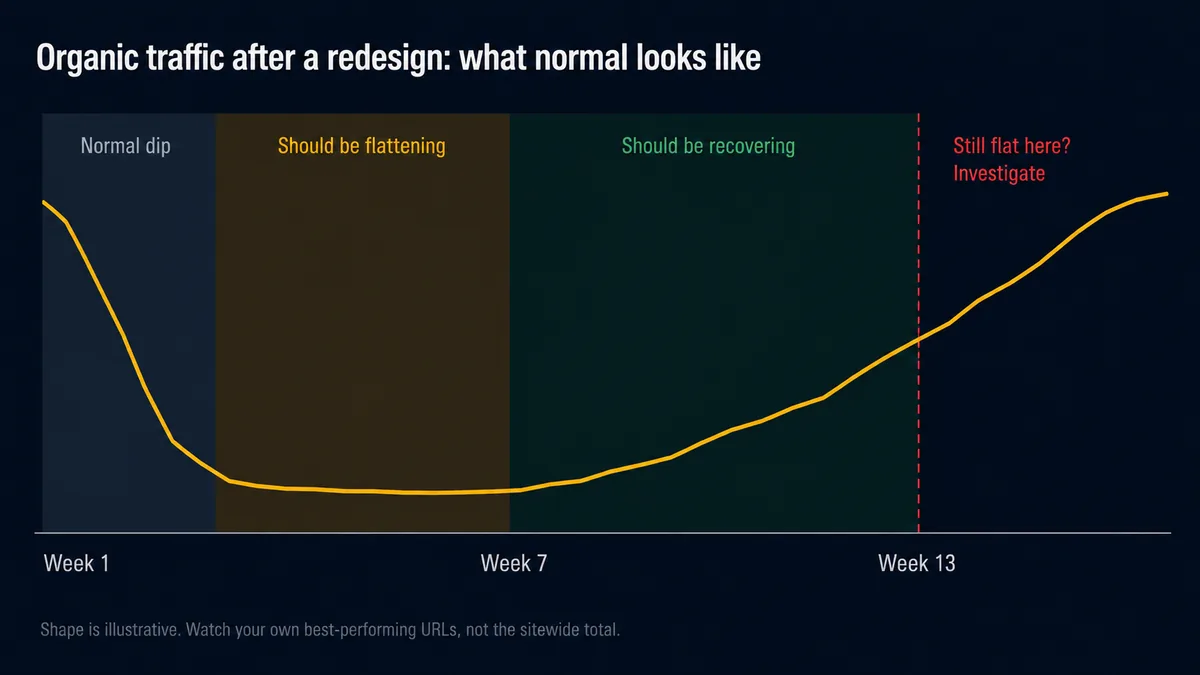
A temporary dip in the first few weeks after launch is ordinary and expected, not a sign something went wrong. Google has to re-crawl the entire site, process every redirect, and re-evaluate every page against its new URL and its new environment. That process is not instant. With a correctly executed migration, most sites see initial recovery within two to three months and stabilise by month four to six.
What is not ordinary is a dip that keeps deepening past the first month, or one where specific high-value pages disappear from the index entirely rather than just losing position. Those are the signatures of a genuine technical problem, not normal re-indexing lag. If you're still monitoring weeks after launch, our ongoing maintenance and monitoring plans cover exactly this kind of post-launch watch, not just the migration itself. And if the migration was part of a full redesign, cross-check against the full website redesign checklist for everything outside SEO that also needs verifying.
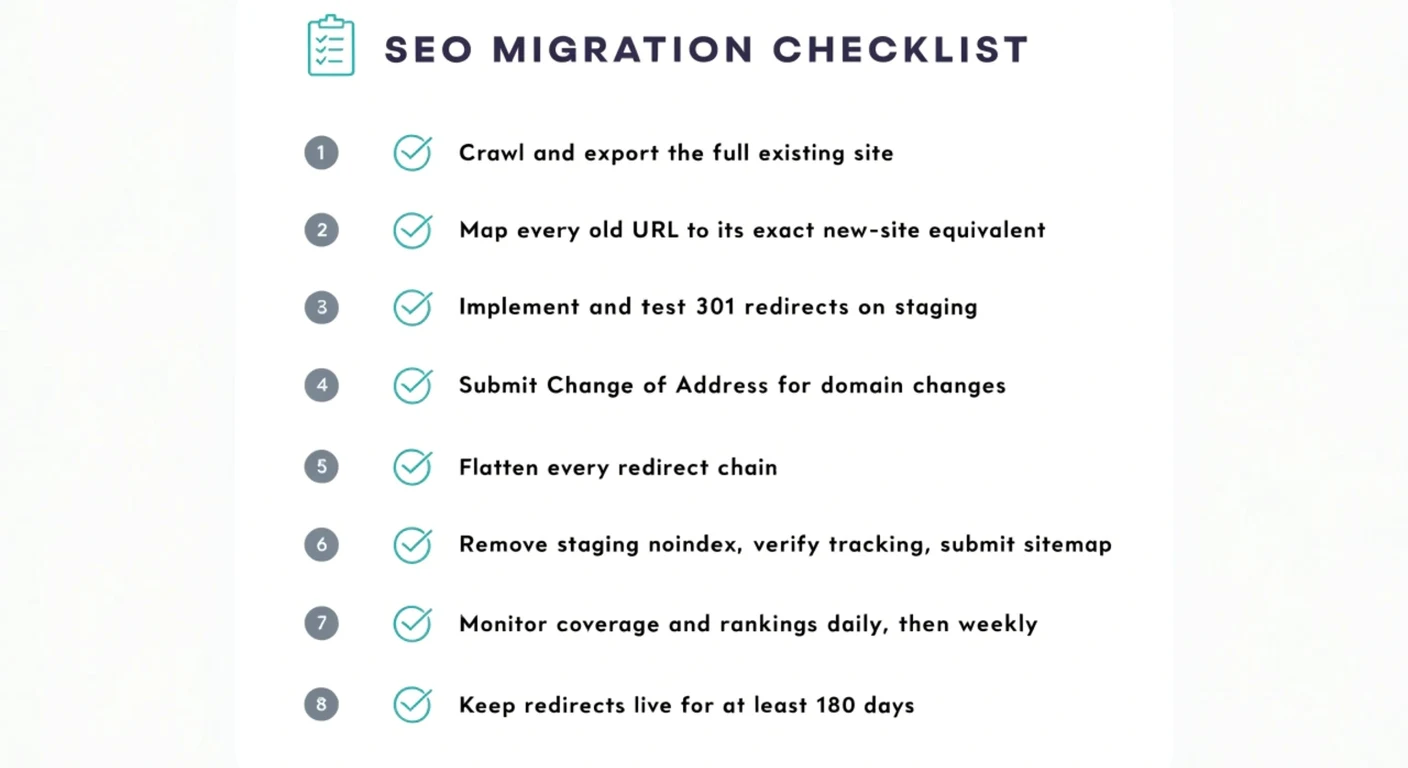
The SEO Migration Checklist, Summarised
Everything above, as a single reference list:
- Crawl and export the full existing site: URLs, titles, metadata, canonical tags, current rankings for top pages.
- Map every old URL to its exact new-site equivalent, not to a category page or the homepage.
- Implement 301 redirects, never 302, and test the full map on a noindexed staging environment.
- For a domain change, submit Change of Address in Search Console for every verified property, www and non-www included.
- Crawl for and flatten redirect chains so every old URL resolves in a single hop.
- On launch day, remove staging noindex tags, verify tracking, and submit a fresh XML sitemap immediately.
- Monitor coverage, crawl errors, and top-page rankings daily for the first two weeks, then weekly through week eight.
- Keep every redirect live for at least 180 days post-launch.