Website redesign SEO comes down to one thing more than any other: every URL that changes needs a 301 redirect pointing at its closest equivalent page. Do that properly and a redesign costs you a few weeks of wobble. Skip it and you hand back rankings that took years to build, because search engines treat an unmapped page as a new page with no history.
The design is almost never the reason traffic falls. The URL handling is. Everything below is the process we use, including the mistake we made on our own site and what it cost.
Why Rankings Drop After a Redesign
A ranking is attached to a URL, not to a business. When that URL disappears or moves without a redirect, the accumulated authority has nowhere to go. Search engines see a page that no longer exists and a different page that looks new, and treat them as unrelated.
Three things cause most of the damage, in this order. URLs change and are not mapped. Old URLs are redirected somewhere generic instead of to their equivalent. And page titles, descriptions and internal links are re-entered carelessly during the rebuild, so pages that did survive no longer describe themselves the way they used to.
The mistake we made on our own site
We are not writing this from theory. Two pages on this site, both of which ranked, were redirected to the blog index during an earlier rebuild rather than to an equivalent article. They kept their positions on Bing at places one through ten and earned 144 impressions and zero clicks, because every one of those searchers landed on a list of unrelated posts and left.
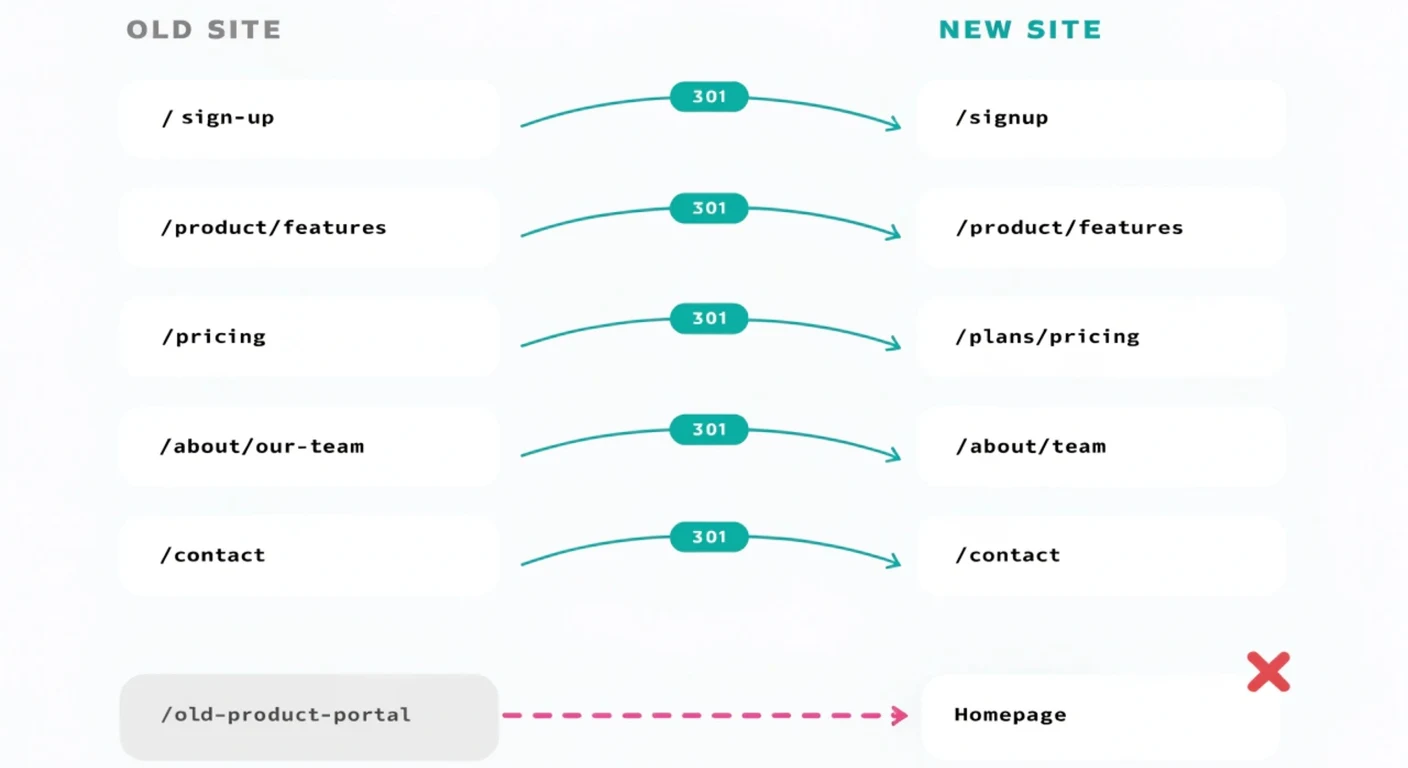
Google names this failure mode directly. Its site move documentation says: "Don't redirect many old URLs to one irrelevant single URL destination, such as the home page of the new site. This can confuse users and might be treated as a soft 404 error." A blog index is the same mistake wearing a different hat.
We restored both pages, and when we later moved them into the blog properly, each old URL went to its own article. Same technique, opposite outcome, and the difference was purely where the redirect pointed.
What to Protect Before Touching Anything
Document the current state first, because once the old site is gone you cannot go back and measure what you had. This takes an afternoon and it is the difference between knowing whether a redesign worked and guessing.
- Export every indexed URL. Search Console's coverage report plus a full crawl of the live site. Not the sitemap alone, which usually lists fewer pages than are actually indexed.
- Record current performance per page, not sitewide. Impressions, clicks and average position for your top fifty URLs. A sitewide average hides the one page that was quietly producing your enquiries.
- Note which pages hold inbound links. Those carry the most transferable value and are the most expensive to lose.
- Save the current titles and meta descriptions. Re-entering these from memory during a rebuild is how pages that kept their URLs still lose position.
- Screenshot the conversion paths. Which form, on which page, fed by which links. Rankings surviving a redesign is no use if the enquiry route breaks.
Build the URL Map
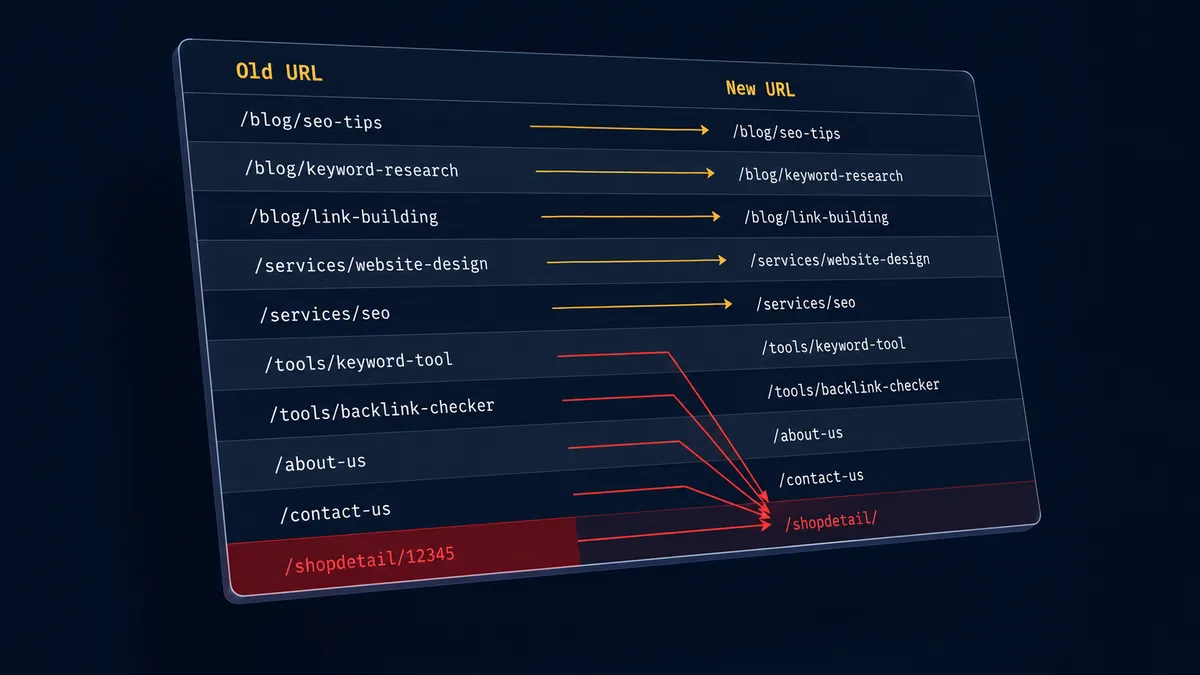
One spreadsheet, one row per old URL, one destination each. This is the core of website redesign SEO and the step teams skip when a launch date starts slipping.
The map has to cover everything that exists, not everything you remember. Service and product pages, every blog post, pagination, category and tag archives, and media file URLs where they carry inbound links. The long tail is usually where the accumulated equity sits, precisely because nobody has thought about those URLs in years.
For each row, pick the closest match on content and intent. Where no equivalent exists, the honest options are to keep the page, write a replacement, or accept the loss deliberately. What is not an option is sending it somewhere generic.
Redirect rules that decide the outcome
- 301, never 302, for anything permanent. Google's redirect documentation is explicit about the difference: with a 301 the indexing pipeline treats the target as canonical, and with a 302 it does not. A 302 therefore leaves the old URL indexed and competing with the new one.
- Never point a batch of pages at the homepage. Mass catch-all redirects are read as soft 404s and the authority is thrown away.
- No chains. If A goes to B and B goes to C, every hop burns crawl budget and slows real visitors. Point A directly at C. Chains usually appear on sites redesigned more than once where old rules were never consolidated.
- Implement at the infrastructure level before launch, not in a plugin added afterwards.
QA the Redirects on Staging, Not After Launch
Crawl your full list of old URLs against the staging environment and confirm each resolves to its intended destination in a single hop. This is the whole point of doing it early: before launch you are preventing damage, after launch you are diagnosing it.
Check a representative sample by hand as well. A crawler confirms a redirect fires; it cannot tell you the destination is contextually wrong. A blog post about pricing that technically redirects to a services index will pass an automated check and fail a human one.
Alongside redirects, verify the things that quietly move: titles and meta descriptions carried across, canonical tags pointing at the new URLs, internal links updated to final destinations rather than through redirects, and analytics and conversion tracking still firing.
What Normal Recovery Actually Looks Like
Most guidance on this is uselessly vague, so here are the ranges people actually report. Published recovery guides put initial recovery at two to three months where redirects were implemented correctly, with rankings stabilising around four to six months. Where mistakes were made, six to twelve months is common, and a badly handled domain migration can run twelve to eighteen. Some rankings never fully return.
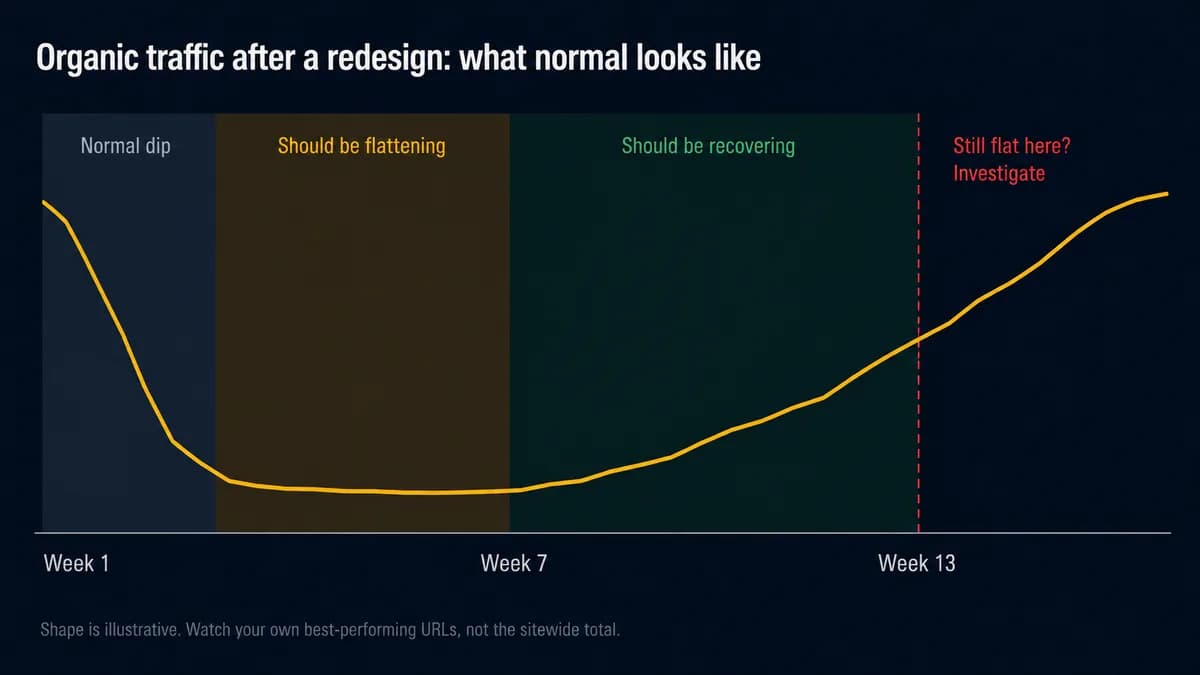
A temporary dip in the first weeks is expected while Google re-crawls the site and processes the redirects. The useful question is not whether traffic fell but whether it is behaving normally, and that needs thresholds rather than feelings:
- First two weeks: fluctuation, including drops, is ordinary. Check daily but change nothing unless pages are falling out of the index.
- Weeks three to six: the trend should be flattening then rising. Still deepening here means something is wrong, and it is usually redirects.
- Past three months with no recovery: stop waiting. Re-crawl the old URL list, check coverage for exclusions, and confirm the redirects still resolve in one hop.
Watch impressions on your previously best-performing URLs specifically, not the sitewide total. The average can look calm while the page that used to carry your enquiries has quietly gone.
When a Redesign Is Really a Rebuild
Sometimes the honest answer is that a redesign will not fix the problem. If pages are slow because the platform ships megabytes of unused code, or adding a service means fighting the template, new visuals change nothing. The complaints come back within a year.
That is worth establishing before design work starts, because the two jobs have different costs and different timelines. We measured ten construction company websites and the heaviest shipped 47.9 MB, taking over a minute and a half to paint on mobile. No redesign rescues that. The build underneath has to change.
What It Costs
Our redesigns are fixed price and published rather than quoted on request: $799 for a five-page rebuild, $1,499 once you need a page per service and per area, and $2,499 and up for multi-branch work. Delivery runs two to eight weeks, and URL mapping is part of every one of them rather than an add-on.
What moves the number is how many URLs exist, how many need genuinely new content rather than a port, and whether the site connects to anything else. Count your indexed URLs before you ask anyone for a price. That single figure will make the quotes you get back comparable. For the full package-by-package breakdown, see what a website redesign actually costs. If the site also needs technical SEO work rather than a full rebuild, see what SEO actually costs for the same kind of fixed-price breakdown.
The Short Version
Website redesign SEO is not complicated, it is just unforgiving. Export every URL before you start, map each one to its closest equivalent, use 301s with no chains and no catch-alls, test the whole map on staging, and watch your best pages rather than your sitewide average for three months afterwards.
The one mistake that does the most damage is also the easiest to make when a deadline is close: pointing a batch of old URLs somewhere generic because mapping them properly takes an afternoon. It cost us 144 impressions and every click attached to them. If you want the mapping handled as part of the build, that is what our redesign service covers, or ask for a fixed quote with your URL count to hand.