
A client came to me last year having already built two websites, one on WordPress and one on Shopify, and abandoned both. Neither platform was wrong. Both were wrong for how she was trying to use them. She picked WordPress because a blog post told her it was “better for SEO,” and Shopify because a friend said it was “easier.” Neither source asked what she sells, how she finds customers, or what she could realistically maintain. That conversation is the one that should happen first, so let’s have it here.
The scale of both platforms is worth knowing. According to W3Techs, WordPress powers 40.7% of all websites on the internet, and 58.9% of every site running a CMS they can identify. Shopify runs over 6.8 million live stores worldwide according to BuiltWith's live crawl, and processes a meaningful share of all online retail. Both are proven. They’re just built for different jobs, and after nearly a decade of building on both, I can usually tell which one fits a business within the first ten minutes of a call. Here’s how that decision actually works.
WordPress vs Shopify: Side-by-Side Comparison
The short version: Shopify wins on time to launch and on not having to think about the plumbing, and WordPress with WooCommerce wins on control, content, and what you own at the end. The table below is the long version. Read the rows that match how your business actually gets customers and ignore the rest, because no store needs to win every row.
| Factor | WordPress + WooCommerce | Shopify |
|---|---|---|
| Hosting | You choose and manage your own host ($10–$50/mo) | Fully managed, included in plan |
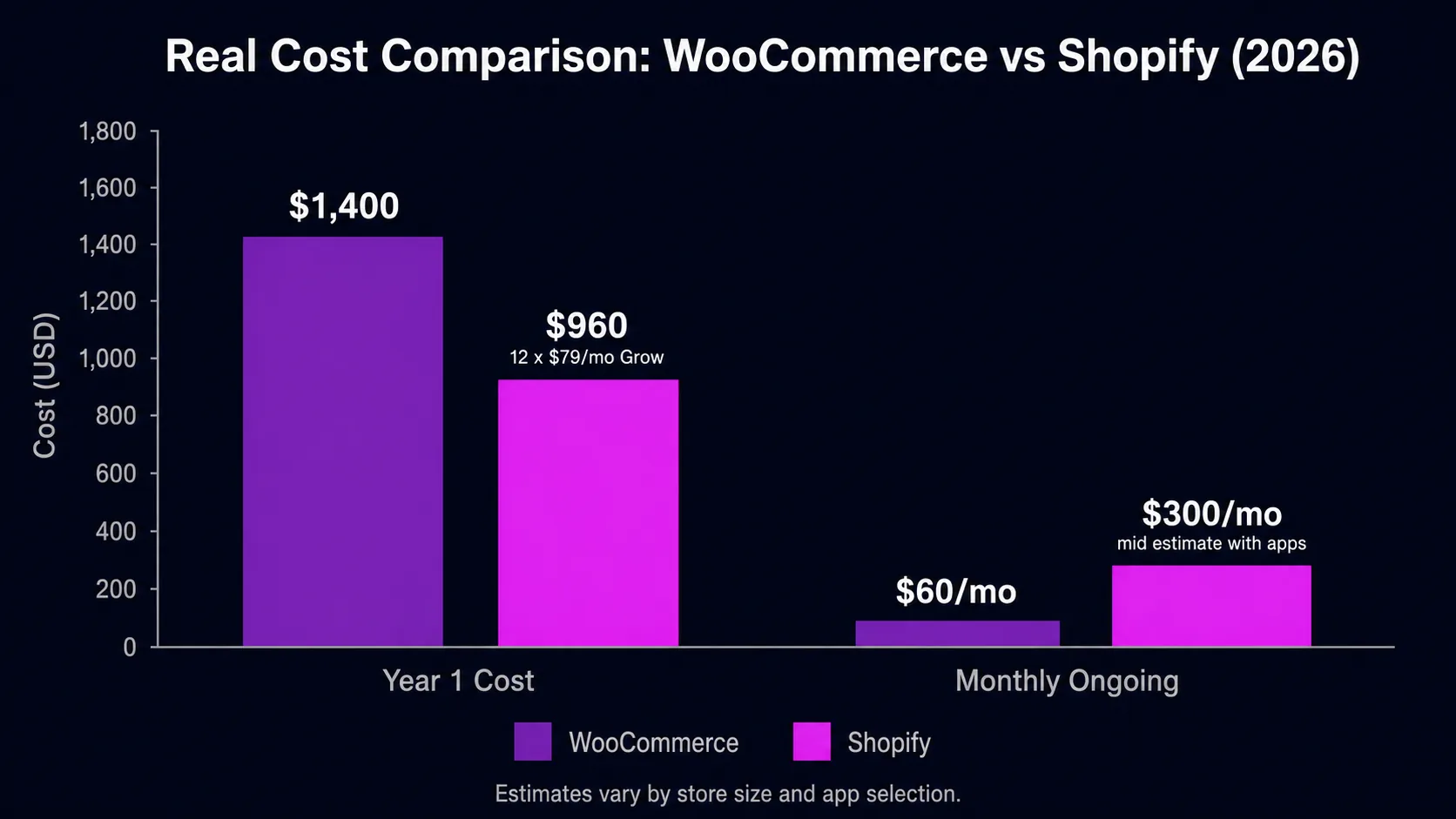
| Starting cost | ~$1,200–$1,600 in Year 1 (hosting, plugins, setup) | $25/mo Basic or $65/mo Grow ($19/$49 on annual billing) |
| Realistic ongoing cost | $20–$100/mo after Year 1 | $89–$549/mo with apps and payment processing |
| Time to launch | 2–4 weeks for a proper build | 2–5 days if you move fast |
| SEO and content tools | Full control over URL structure, content types, custom plugins | Good for product SEO; blog tools are limited |
| Checkout | WooCommerce: highly flexible, needs configuration | Works out of the box, with Shop Pay and built-in fraud handling |
| Security and updates | Your responsibility, requires regular management | Platform handles all security and PCI compliance |
| Customisation | Unlimited: any feature, design, or integration | High within the Shopify framework, some fixed constraints |
| Data ownership | You own everything: code, database, files, hosting | Data is portable but the platform is rented |
| Best for | Content-led businesses, complex builds, full ownership | Product-first stores, fast launches, managed simplicity |
WordPress vs Shopify in One Line
WordPress, usually paired with WooCommerce for selling, gives you total control and total responsibility: hosting, security, updates, and backups are yours to manage or delegate. Shopify hands all of that to the platform in exchange for a monthly fee and a more fixed structure. One is a fully equipped workshop where you own every tool. The other is a turnkey shop you rent and never have to repair. Everything else in this comparison flows from that single trade-off.
Setup Speed and Day-to-Day Management
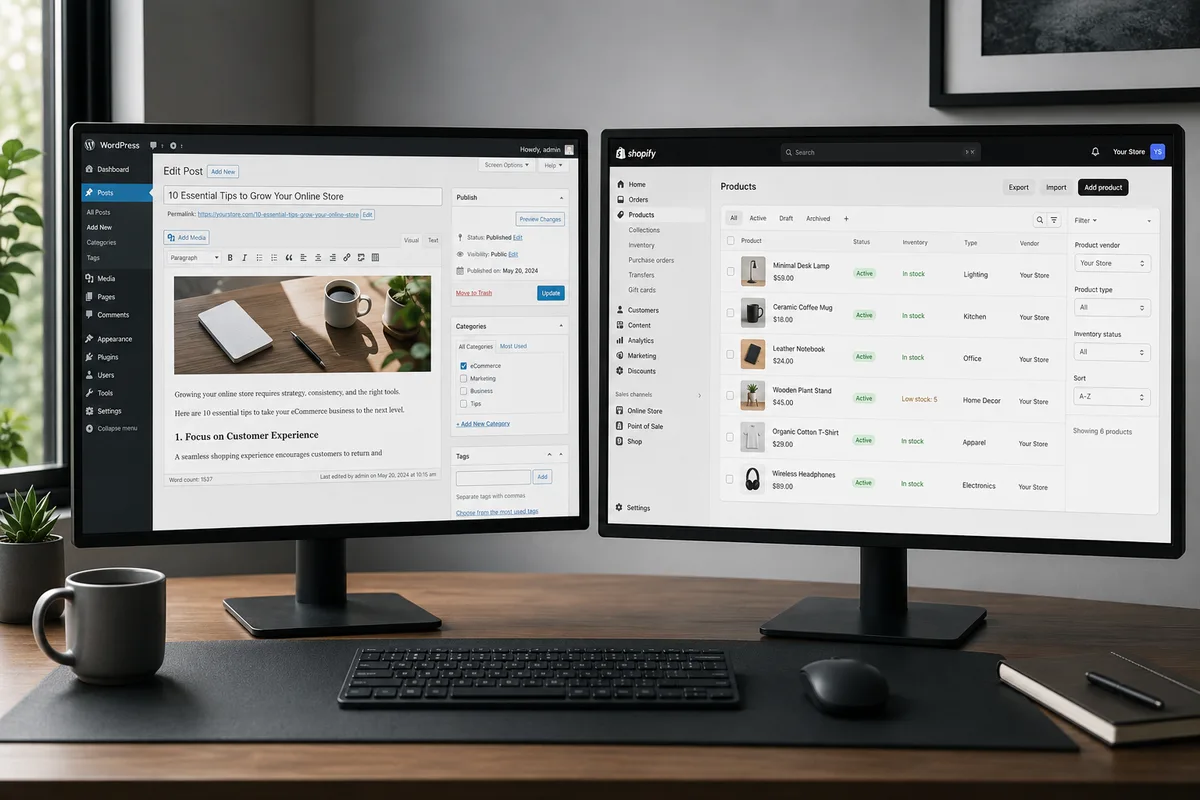
If speed to launch is the priority, Shopify wins comfortably. A non-technical owner can be taking payments within a day or two, with hosting, security, and checkout already handled. A comparable WooCommerce store realistically takes two to three weeks to set up properly, because you’re assembling hosting, a theme, payments, and security yourself or paying someone to do it.
Day to day, the gap continues. Shopify updates itself. WordPress needs core, theme, and plugin updates applied regularly, and skipping them is how stores get hacked. None of this is hard, but it’s real work that someone has to own. Our guide to managing a WordPress website sets out exactly what that work is, so you can decide whether to own it or hand it over. The flip side: once WordPress is built, you’re never boxed in by what the platform decides to allow, remove, or reprice.
The Real Cost, Not the Marketing Number
Shopify’s pricing is transparent: Basic is $39 a month billed monthly ($29 billed yearly), Grow is $105, and Advanced is $399. Most serious stores end up well above the plan fee once you add the apps and payment processing you’ll actually use. WordPress gets marketed as “practically free,” and that hides the truth. A competitive WooCommerce store typically costs $1,200 to $1,600 in year one across hosting, a quality theme, and essential plugins, then less in following years.
Run the numbers over three years and the totals sit closer than either camp admits. What actually separates them is the shape of the cost: Shopify is predictable and rented, WordPress is front-loaded and owned. Neither is cheap done right, and anyone telling you otherwise is cutting a corner you’ll pay for later. I publish the full ranges on our pricing page.
SEO and Content Marketing
This is where I steer clients toward WordPress more often than they expect. If blog posts and organic search are how you win customers, WordPress’s publishing tools are in a different league: full control over URL structure, categories, authors, content types, and every on-page element. The platform was built for publishing, and it shows.
Shopify can absolutely rank, and SEO setup is part of every Shopify build we do, but it locks URL paths like /products/ and /collections/, offers a basic blog at best, and gives you fewer technical levers when you need them. For a pure product store this rarely matters. For a content-led growth strategy, it matters a lot.
E-Commerce Capability
Reverse the picture for selling. Shopify’s checkout is one of the most tested, highest-converting flows on the internet, with Shop Pay, fraud handling, and inventory built in. WooCommerce matches the feature list through extensions, and exceeds it in flexibility, but every capability is something you assemble rather than something that’s simply there. That flexibility is exactly why WooCommerce powers 48.1% of all e-commerce sites with a known platform, per W3Techs, despite needing more assembly than Shopify out of the box. If your store is the business, that out-of-the-box reliability is worth real money. If selling is one part of a bigger content and service operation, WooCommerce inside WordPress keeps everything under one roof.
Choose WordPress / WooCommerce If…
- Content and organic search are how you acquire customers, and you publish regularly.
- You need custom functionality, memberships, bookings, or a layout no theme offers.
- You want full ownership of your data, files, and site architecture long term.
- You’re comfortable with, or happy to hire out, ongoing maintenance and security.
See typical project scopes on our WordPress development services page.
Choose Shopify If…
- Selling products at scale is the whole point, and you want it handled reliably from day one.
- You’d rather pay a predictable monthly fee than manage servers and updates.
- You need dependable checkout, inventory, and payments without technical overhead.
- Speed to launch matters more than unlimited customisation.
Explore our Shopify development options to see what a properly built store looks like.
Security and Maintenance: Who Carries the Risk
This factor gets skipped in most comparisons and decides more outcomes than any feature list. On Shopify, the platform patches vulnerabilities, manages servers, and handles PCI compliance for payments. You never think about it, which is exactly the point. On WordPress, security is your responsibility: core updates, plugin updates, backups, and a firewall are all tasks someone must own, weekly, forever.
WordPress isn’t insecure by nature. The neglected installs are the ones that get hacked, and neglect is the default when a busy owner has no maintenance plan. If you choose WordPress, budget for a maintenance arrangement from day one or commit to doing the updates yourself. The cost of either is small. The cost of a hacked store mid-season is not.
Apps, Plugins, and the Ecosystem Cost
Both platforms extend through ecosystems, and both ecosystems carry hidden costs. Shopify apps charge monthly, almost universally, and a store running ten apps at $10 to $30 each has quietly doubled its platform bill. WordPress plugins are more often one-time or yearly purchases, but each one adds code that must stay updated and compatible.
My rule on both platforms is the same: every app or plugin must earn its place with a function you can name and a result you can see. The leanest store wins on speed, and speed wins on both rankings and conversions, whichever platform you choose.
The Mistake I See Most Often
People choose a platform based on a feature comparison table, then discover the decision was really about maintenance and ownership. The owner who picks WordPress for its flexibility but has no plan for updates ends up with a hacked store. The owner who picks Shopify for its simplicity but builds a content-heavy growth strategy ends up fighting the blog every week. Match the platform to how your business actually operates, not to the best-looking checklist, and either one will serve you well for years.
A Quick Self-Test
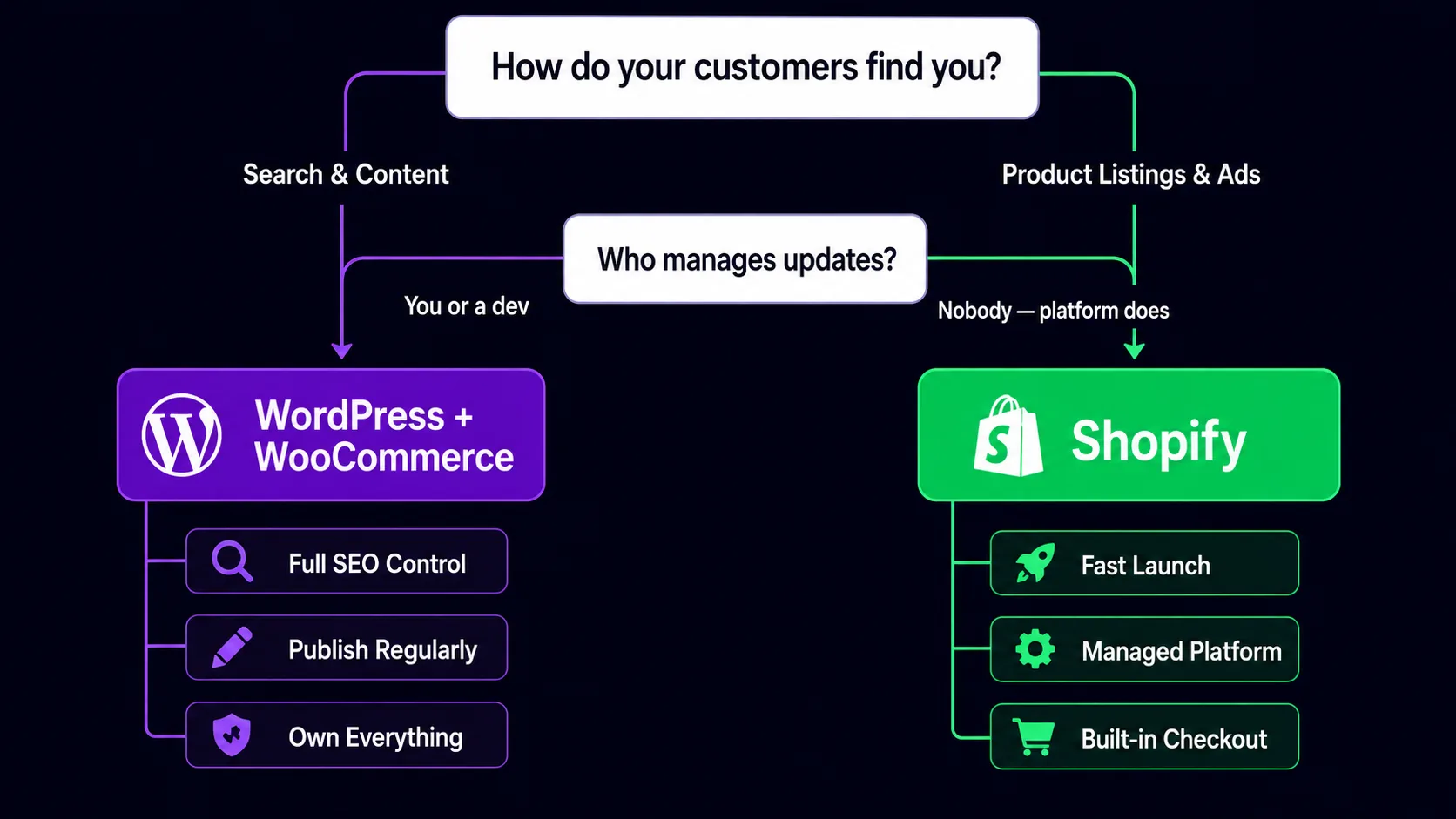
Answer these honestly and the platform usually picks itself. Where will your next hundred customers come from: articles and search rankings, or product listings and ads? Who applies updates on a Tuesday night: you, a developer you trust, or ideally nobody? Will your site still be a store in three years, or could it grow into courses, memberships, or services? Content-led, hands-off, and evolving points to WordPress with a maintenance plan. Product-led, predictable, and focused points to Shopify. Mixed answers are normal, and they’re exactly the situation where a short conversation with someone who builds on both saves you a rebuild later.
Core Web Vitals and Page Speed
Performance matters differently on the two platforms, and it’s worth knowing what you’re getting into before launch. Shopify’s managed hosting delivers fast first-byte times globally with no configuration needed. Its themes are generally leaner than an average WordPress setup, and the CDN is automatic. Out of the box, a basic Shopify store often passes Google's Core Web Vitals thresholds without any specialist work, which is a genuine advantage for owners who don’t want to think about infrastructure.
WordPress’s story is the opposite: unlimited performance potential, but you have to earn it. A default WordPress install with a page builder, six plugins, and shared hosting will fail every CWV benchmark. A custom-built WordPress theme on a VPS with proper caching, image compression, and a CDN will beat most Shopify stores. The difference is effort and experience. If nobody on your side will maintain and tune the technical setup, Shopify’s guardrails are a real advantage. If you have a developer who knows what they’re doing, WordPress’s ceiling is higher.
One metric where Shopify stores commonly struggle is LCP, or Largest Contentful Paint, on product pages with large hero images. Multiple apps loading their own scripts also bloat the JavaScript payload in ways that hurt INP. The fixes are the same: image compression, lazy loading below the fold, and app audits to remove anything you don’t actively use. But they require knowing to look. The fix sequence is the same one laid out in the speed guide on this blog.
What Happens If You Want to Switch Platforms Later
The migration question comes up more than it should, which tells you people are making the initial choice too fast. Shopify to WooCommerce is manageable but time-consuming: products, orders, customer data, and URLs all need careful handling, and the SEO risk is real if the redirect work is sloppy. WordPress to Shopify is generally cleaner on the technical side but more disruptive to SEO because Shopify enforces URL structures that may not match what your WordPress site used.
The honest answer is that no migration is trivial, and the cost in time, risk, and developer fees is almost always larger than people expect. Both platforms are reliable long-term homes when chosen correctly for the business type. The businesses that switch are usually the ones that chose based on price or a friend’s recommendation rather than their own traffic source and content model. Choose once with that model in mind and you likely won’t revisit the decision.
Still on the fence? Tell me what you sell and how you get customers, and I’ll tell you which platform fits. Not the one that earns me a bigger project fee, the one that fits. Once you've decided, our ecommerce website development service covers both Shopify and WooCommerce builds, so you're not locked into whichever developer only knows one of them.