Website management services should run $99 to $399 a month and cover four things at minimum: updates, backups, security monitoring, and uptime checks. That is true whatever platform the site runs on, WordPress, Wix, Shopify, or something custom. Beyond that floor, plans vary a lot in what "full service" actually means. A lot of pages selling this service are vague about it on purpose. They list generic benefits instead of a specific price or a specific scope of work.
The same product also gets searched as web management services, web site management, or web management business, all shorthand for the same thing minus the extra syllable. Narrow the search to a specific platform and the naming shifts again: a WordPress site owner looking for the same plan usually types wordpress website management services, wordpress management service, or just wp management services instead. A vendor that calls itself a wp maintenance company or a wordpress management company is selling this exact scope, not something different. This guide covers what a real plan includes and what "full service" means in practice. It also covers what a company that actually delivers looks like compared to one that does not, and how pricing works when it is published honestly instead of hidden behind a contact form. If your site specifically runs WordPress, see the complete WordPress management guide for the platform-specific detail this page does not cover.
What Website Management Services Actually Include
Strip away the marketing language and every legitimate plan is built around the same core work, plus optional extras layered on top.
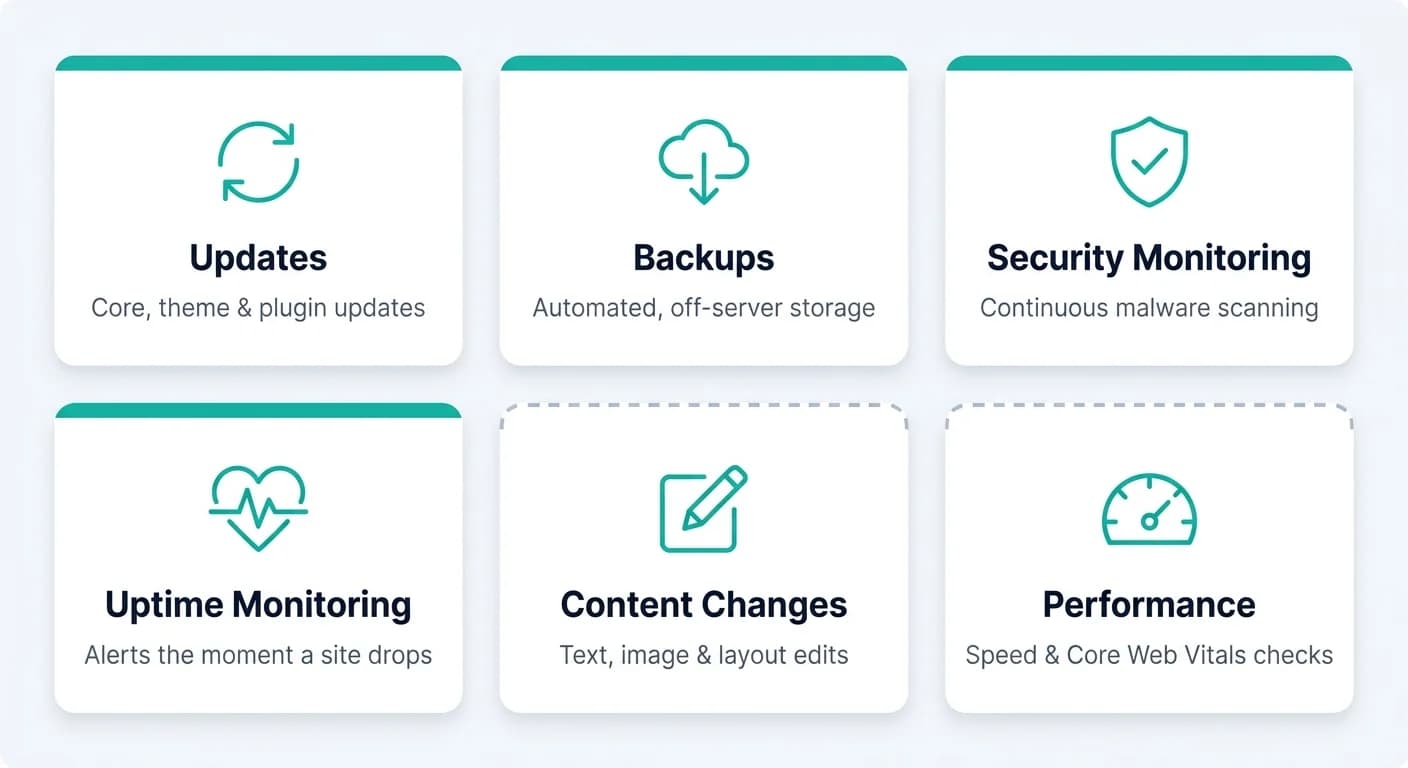
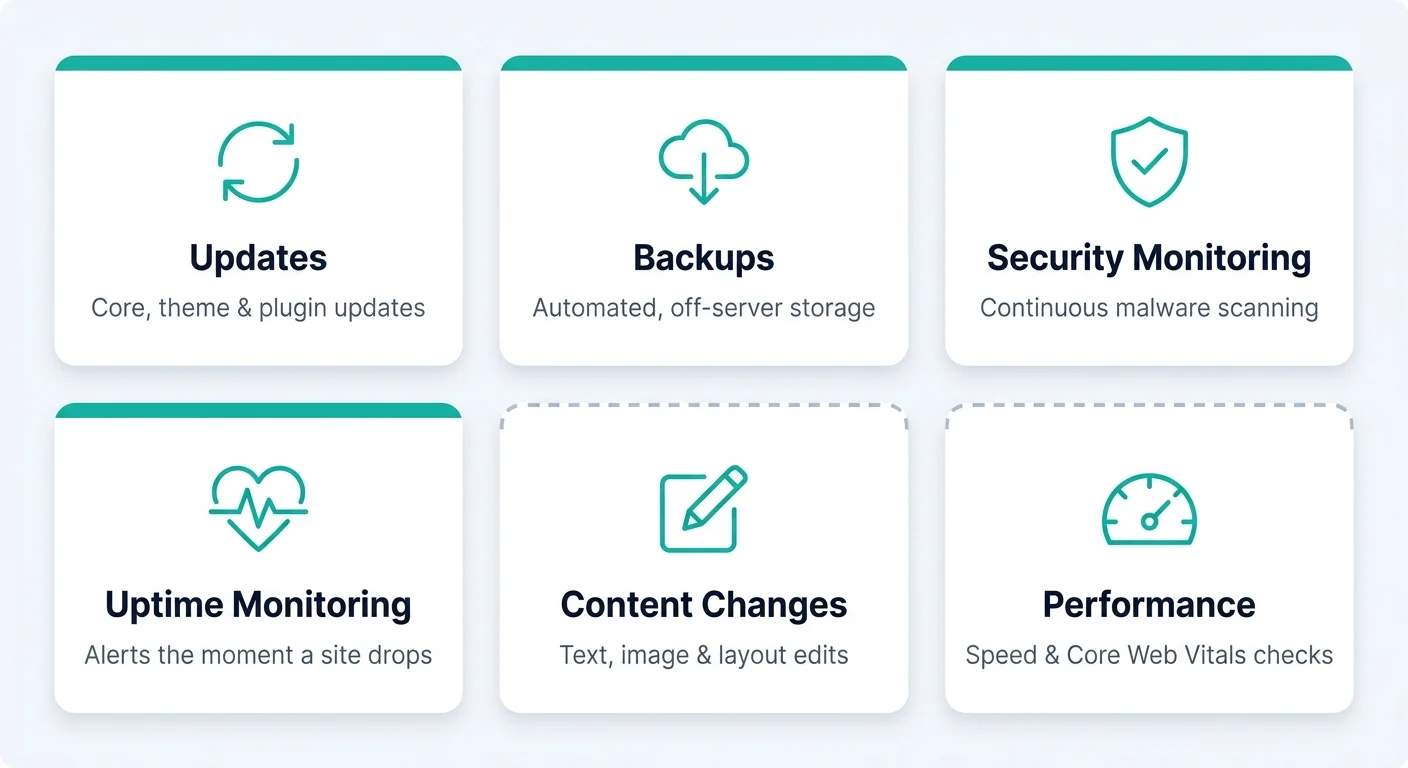
- Updates. Core software, themes, plugins or apps, and any custom code, kept current on a schedule and tested before anything touches the live site.
- Backups. Taken automatically, stored somewhere other than the live server, and actually restore-tested rather than just taken and left untouched.
- Security monitoring. Continuous scanning for malware and known vulnerabilities, not a monthly glance. Most attacks are automated, not targeted. Verizon's 2026 DBIR now puts vulnerability exploitation, not a targeted human attacker, ahead of stolen credentials as the top breach entry point.
- Uptime monitoring. Something checking whether the site is actually live, and alerting a person the moment it is not. UptimeRobot's own free plan checks every 5 minutes, a real baseline any provider should clear easily.
- Content changes. Most plans bundle a set number of hours or requests per month, typically 2 to 4 hours, for text edits, image swaps, or small layout tweaks, billed separately once that allowance runs out.
- Performance monitoring. Page speed and Core Web Vitals checked periodically, since a site that was fast at launch does not stay that way on its own.
The first four are non-negotiable. A plan that skips any of them is not really a management service, it is a much smaller product wearing that name.
Website Management Services for Small Business
Small business website management usually means one thing the bigger agency plans do not always offer: a single point of contact who actually knows the site. Not a rotating support queue. The same product gets searched as web management services for small business or small business website management services just as often. For a business with no in-house technical staff, the named contact matters more than any individual feature on the list.
A full service website design and management arrangement is common for small businesses starting from scratch. Some provider pages frame this exact setup as full service website design and management for small business. It bundles the initial build and the ongoing management under one relationship, rather than handing the finished site to a separate vendor once it launches. That avoids the handoff gap where nobody is quite sure who is responsible for what in the first few months.
The tradeoff to watch for is the same across every naming variant, whether a page calls itself professional website management for small business, professional web management services, or professional website management services. All three should still mean the same four core protections as any other plan. A lower price is often lower scope, not a better deal. It is worth checking what specifically drops out at the cheaper tiers, rather than assuming "small business" pricing is simply a discount.
Full Service vs À La Carte: What "Full Service" Actually Means
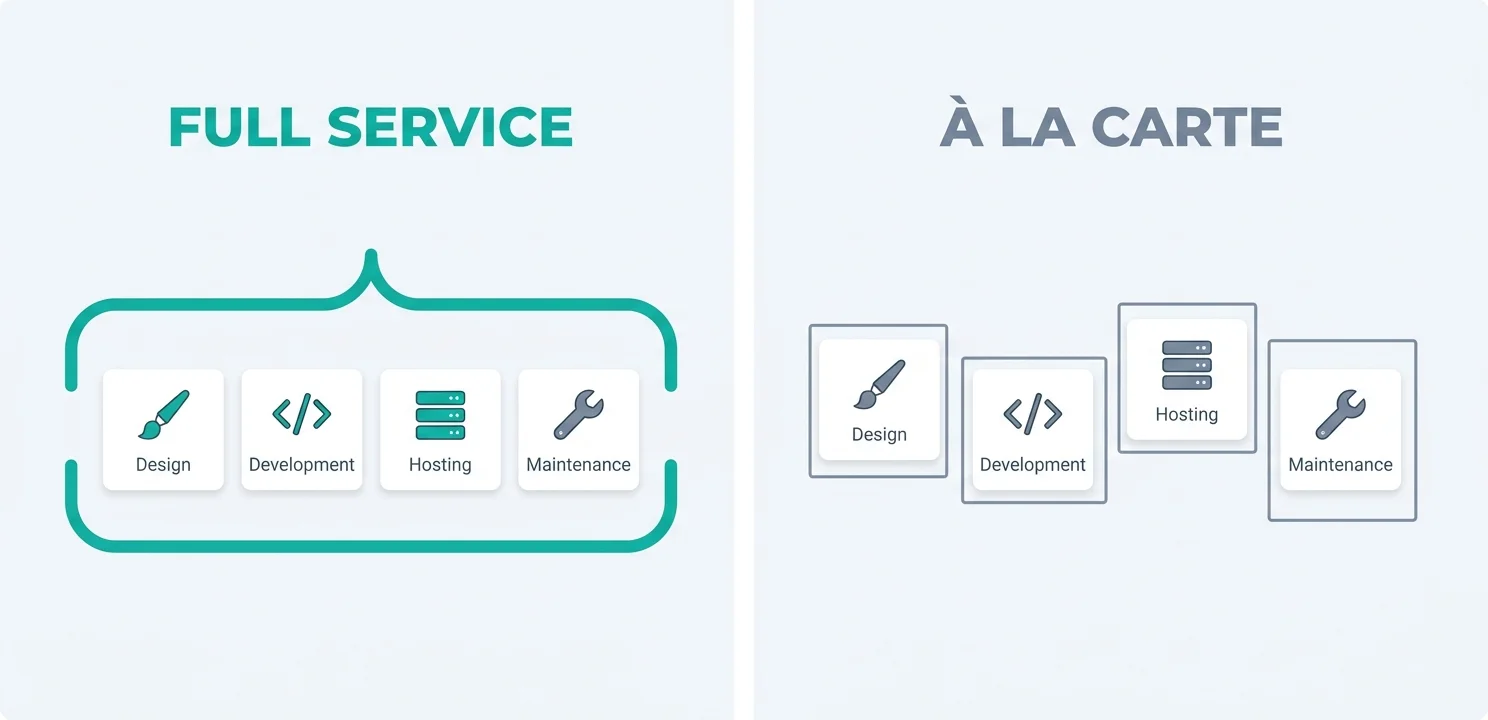
Full service website management is used loosely across the industry. Some pages bill the identical service as website design and management services instead, so it is worth pinning down. At minimum, it should mean one vendor handles design, development, hosting coordination, and ongoing maintenance together. That is different from a website manager who only touches maintenance and points you elsewhere for everything else. A complete website management plan extends that to include content strategy and performance work as standard, not billed as an add-on.
The alternative is à la carte: a maintenance-only plan bolted onto a site someone else built, or a design shop that stops responding once the invoice is paid. Neither is wrong on its own. The problem shows up when a business expects "full service" and gets one or the other. The gap only surfaces once something needs fixing and nobody on the current plan is actually equipped to fix it.
What to Look for in a Website Management Company
Comparison pages for website management companies, and roundups claiming to rank the best website management services, tend to list features without saying which ones actually matter. A web management company is not hard to evaluate once you know what to actually ask. Five questions do most of that work.
Price and Response Time
- Is the price a real number? A published dollar figure means the company is confident enough in its own cost structure to commit to it in writing. A "request a quote" form usually means the price depends on how much the sales call thinks you will pay.
- Is there a specific response time, in writing? "Fast" and "priority support" are marketing words, not commitments. A number, like same-day response within 24 hours, that appears in the plan description or the contract is the only version that means anything when something actually breaks.
Reliability and Fit
- Are backups restore-tested, not just taken? Every provider says they take backups. Far fewer can say when they last actually restored one to confirm it works, or whether it follows the 3-2-1 backup rule CISA recommends. A backup that has never been tested is a hope, not a safety net.
- Is there a named point of contact? A support ticket queue resets who you are talking to every time. A named person who already knows the site answers questions faster and makes fewer mistakes than someone reading the account for the first time.
- Does the plan actually cover the platform the site runs on? A plan written for WordPress in general terms does not automatically know your specific plugin stack. A Wix or Shopify site needs a genuinely different toolkit than a self-hosted one does. Generic coverage language is a sign the plan was not built for your platform specifically.
This applies whether a company markets itself as full service web management or something plainer. A vendor that answers all five questions specifically, rather than with general reassurance, is usually the safer choice regardless of price tier. Vague answers to direct questions are the clearest signal available before signing anything.
Website Management by Platform: What Actually Changes
The four core protections stay the same everywhere. The tools and the specific risks underneath them do not.
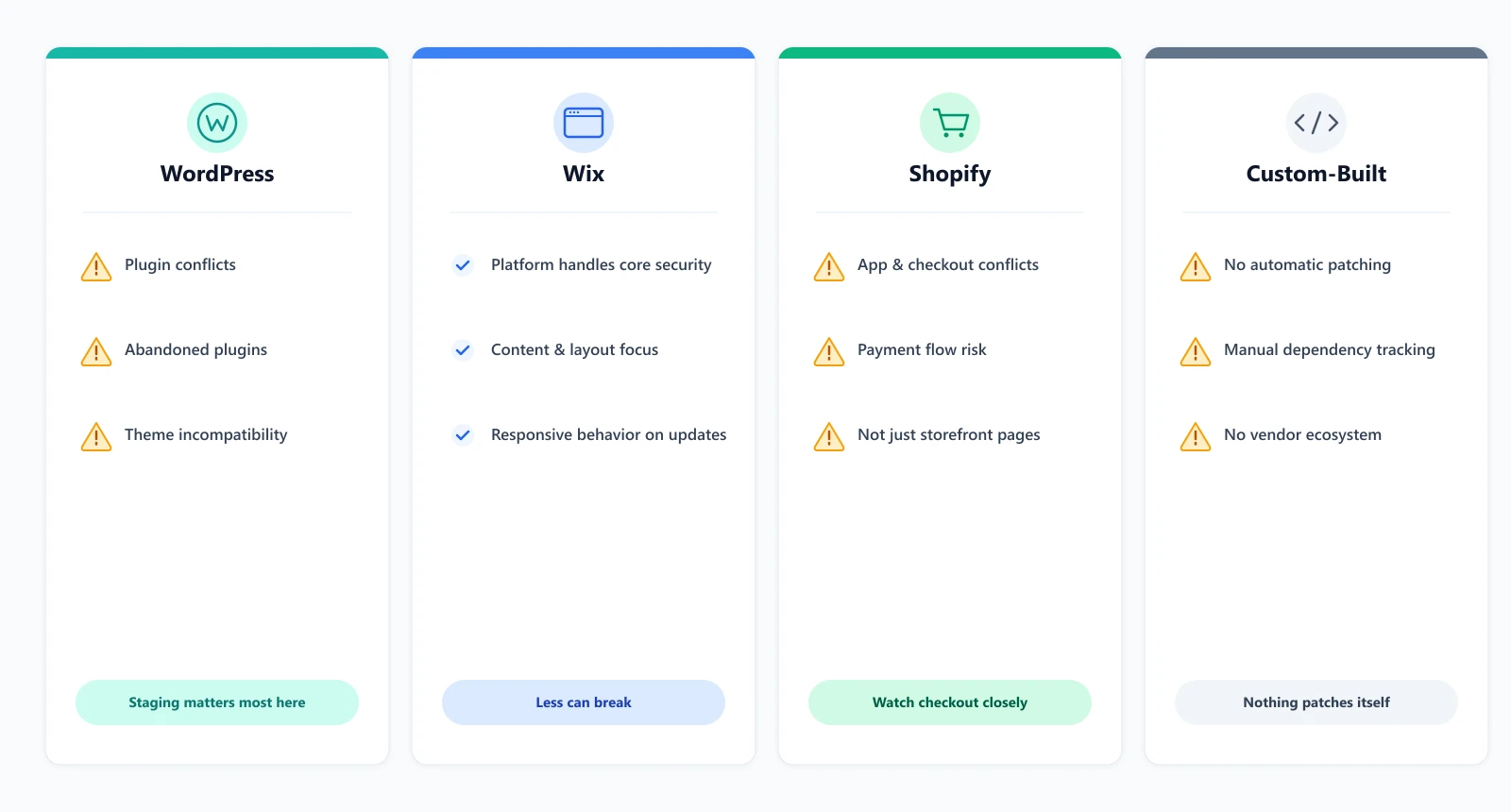
- WordPress. The most flexible and the most exposed. It also runs the largest share of the web by a wide margin, powering 40.7% of all websites according to W3Techs. That scale is exactly why it draws the most attention from attackers scanning for outdated plugins. Patchstack's 2026 whitepaper found 91% of 2025's disclosed WordPress vulnerabilities lived in plugins, not core, the exact gap a generic "we handle WordPress" line does not cover. Staging environments matter more here than on any other platform.
- Wix. The platform itself handles hosting and core security, so management here is mostly content, layout, and making sure responsive behavior holds up across screen sizes as Wix pushes its own platform updates. Less can technically break, but what does break is harder to fix without developer access to the underlying code.
- Shopify. Adds a layer neither of the others has: apps that touch checkout and payment flows directly. A management plan for a Shopify store needs to watch app conflicts and checkout behavior specifically, not just the storefront pages a visitor sees. Not sure which platform fits? See WordPress vs Shopify: which platform is right for your business.
- Custom-built or hand-coded sites. No platform vendor is patching anything automatically. Every dependency, every library version, and every server configuration choice is something a management plan has to track manually, since there is no ecosystem doing part of the job by default.
A plan that describes its coverage the same way regardless of platform is describing a template, not your specific site.
Signs Your Current Website Management Is Not Working
A few patterns show up consistently when a plan is charging for management that is not really happening.
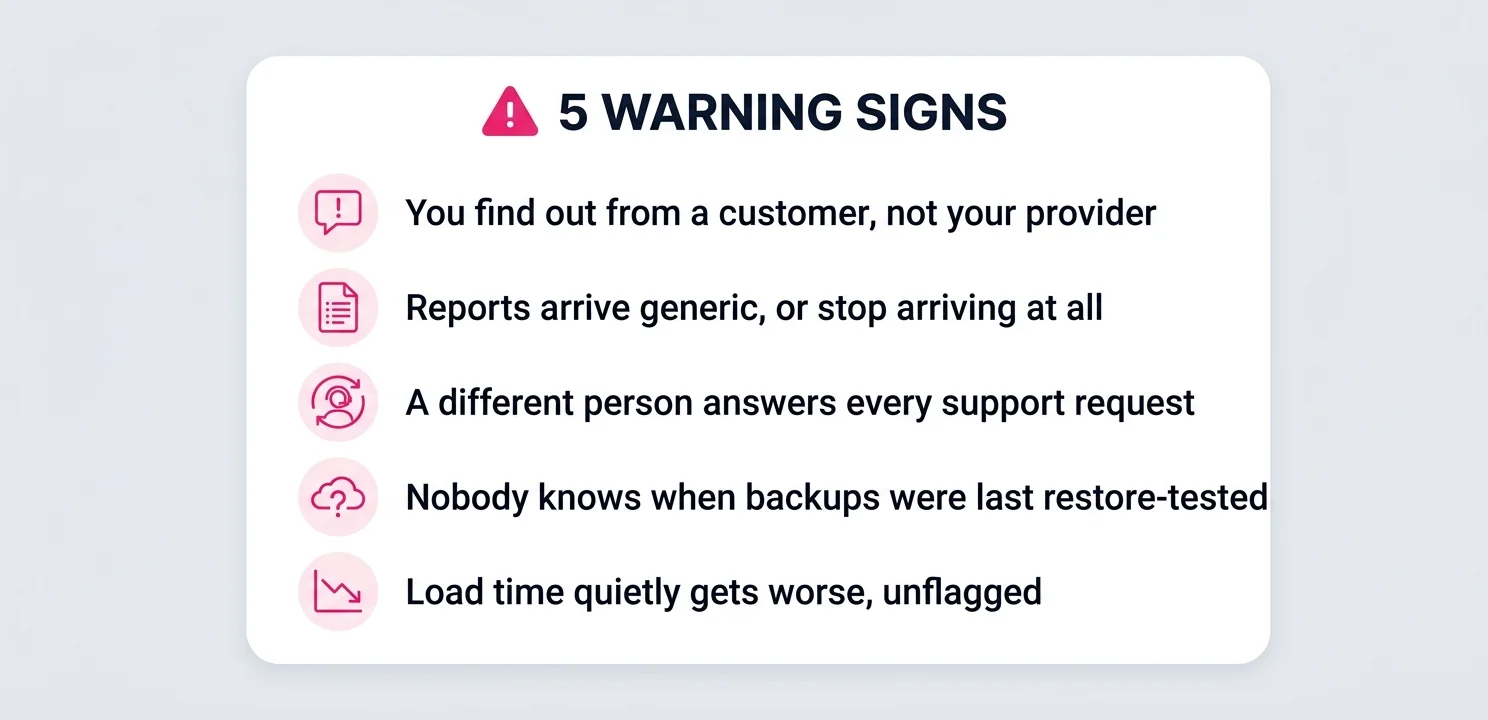
- You find out about a problem from a customer before your provider mentions it.
- Monthly reports stop arriving, or arrive as a generic template with nothing specific to your site changed month to month.
- A support request gets answered by a different person every time, and each one asks you to re-explain the setup from scratch.
- Nobody can tell you when your last backup was actually restore-tested, only when one was most recently taken.
- The site's load time or Core Web Vitals scores have quietly gotten worse over months and nobody flagged it before you noticed.
Any one of these on its own is not necessarily a crisis. Two or more together usually mean the plan is being paid for on paper without the actual work behind it. That is worth a direct conversation with the vendor before assuming the price itself is the problem.
Website Management vs Website Maintenance: Is There a Difference?
Mostly not. A website maintainer and a website manager are largely doing the same job under different job titles, and the same is true of "management" versus "maintenance" as service names. Where a real distinction sometimes exists: maintenance leans toward the technical side, updates, backups, security, while management can include broader oversight, content strategy, and coordinating between hosting, design, and SEO. Many providers use both words for the identical product.
Website administration services is a third label for roughly the same thing, more common in enterprise and government procurement language than in small business marketing. The label on the page matters less than the feature list underneath it, the same rule that applies across every naming variant in this space. For the WordPress-specific breakdown of what this work actually involves, see what WordPress maintenance covers.
What Website Management Services Cost
Our own plans run $99 to $399 a month across three tiers. Every tier covers the same four core protections, updates, backups, security monitoring, and uptime checks. What changes at higher tiers is response speed, how many hours of hands-on work are bundled in, and extra coverage like SEO monitoring at the top tier. None of that changes based on which platform the site runs on.
The full breakdown of what is included at each price point is on our management plan pricing page. If the site runs on WordPress specifically, a closer look at what a real care plan should include is worth reading too.
Why Website Management Affects SEO, Not Just Uptime
A slow site loses rankings, not just visitors. Google's own Core Web Vitals guidance rates Largest Contentful Paint under 2.5 seconds as good, up to 4.0 seconds as needing improvement, and anything past that as poor. All three bands are measured at the 75th percentile of real page loads. A site that was fast at launch drifts through those bands over time. Plugins accumulate, images pile up unoptimized, and nobody clears a growing cache. None of that shows up as an obvious error. It shows up as a slow, gradual ranking decline that most site owners never connect back to the actual cause.
A Hacked Site Costs More Than Traffic
Security has a direct SEO cost too. A hacked site gets flagged in Google's Safe Browsing database, and visitors who click through anyway see a browser warning before the page even loads. According to Wordfence's own security learning center, the traffic hit is immediate once those warnings appear. Ranking recovery can happen within 24 hours, but only once the site is confirmed clean and a malware review is requested through Search Console. The fast recovery only applies if the infection is caught and removed quickly. A hack that sits undetected for weeks does far more lasting damage than one caught the same day. Continuous security monitoring is not a separate line item from SEO work. It is one of the ways SEO work actually gets protected.
Uptime works the same way at a smaller scale. A site that goes down during a crawl can have that visit logged as an error. Repeated errors affect how often and how deeply a site gets crawled going forward, the same 24/7 monitoring problem covered earlier in this guide, just measured by a search engine instead of a person. None of this means website management replaces SEO work. It means a site with no ongoing management is quietly working against whatever SEO work is being done on top of it. That drag builds month after month, in a way nobody notices until traffic has already dropped.
Switching Website Management Providers Without Downtime
Moving providers is a common enough situation that it is worth planning for, not dreading. A clean switch has a few real steps.
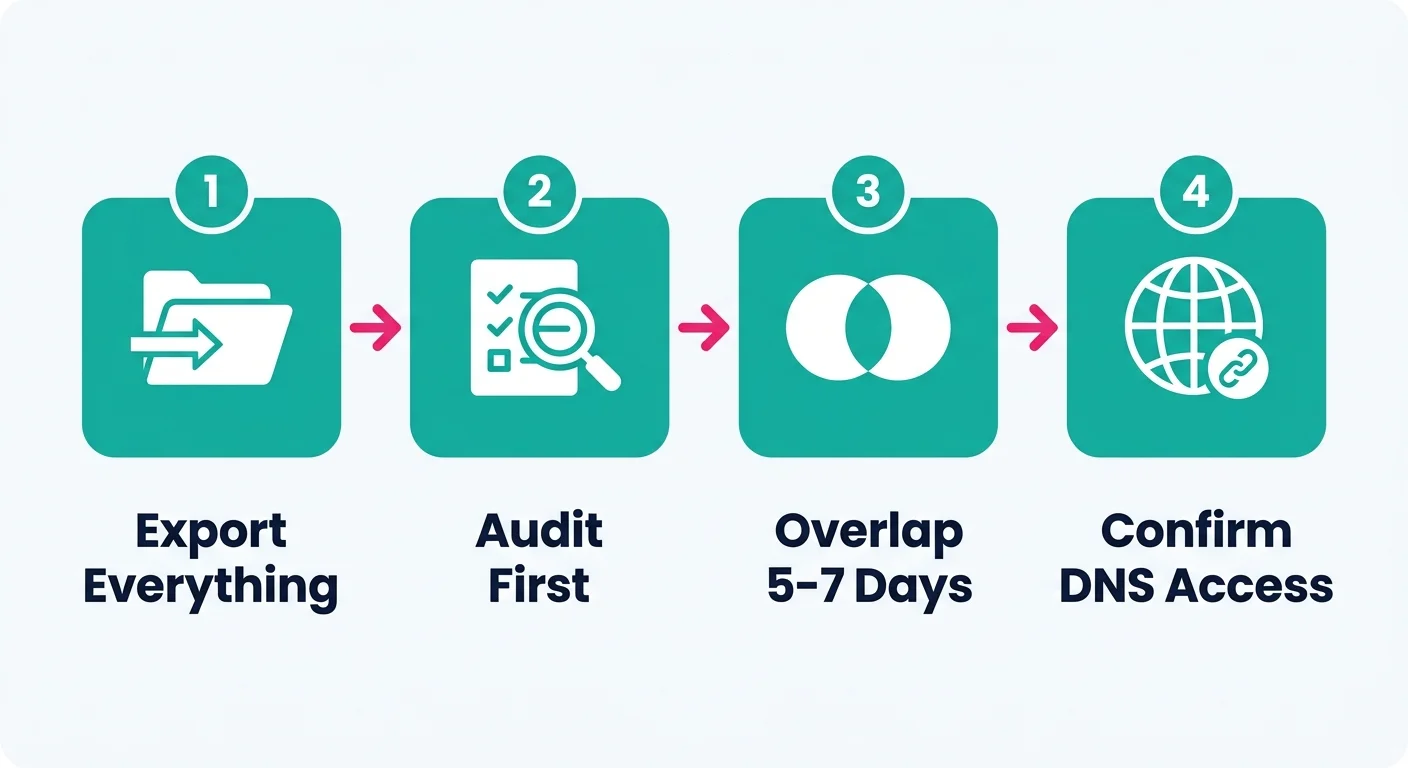
- Get a full export before anything else. A current backup, admin access credentials, and a plugin or app inventory. A reasonable turnaround for handing these over is 1 to 2 business days. If a current provider takes noticeably longer, that alone says something about how the relationship has been run.
- Have the new provider audit before they touch anything. The same security-baseline audit a new plan should run on day one applies just as much to a site moving between providers as one starting fresh.
- Overlap the two plans by 5 to 7 days rather than switching on a single date. A short overlap catches anything the export missed before the old provider's access is revoked and there is no way back to ask them a question.
- Confirm domain, DNS, and hosting access separately from the management plan itself. These sometimes sit with a different account than the one running the maintenance work, and losing track of which is which is the single most common way a switch turns into an actual outage. Cloudflare's own DNS documentation notes propagation can take up to 48 hours depending on the record's TTL, so this is not something to sort out on the day of the switch itself.
None of this requires the site to go offline. It requires someone treating the handover as its own small project instead of a single click of a cancel button.
How We Handle Website Management
Every plan starts with a full audit of the existing site, whatever platform it runs on. Existing issues get documented and fixed before ongoing monitoring begins, so we are protecting a clean baseline rather than a site with known problems already sitting in it. Updates and changes are tested before they go live wherever the platform supports it. Critical security patches move inside a 48 hour SLA from release, rather than waiting for the regular monthly cycle. Security headers and file permissions get checked again every 3 months. Security and uptime monitoring run continuously, and every month you get a plain-language report of what was updated, checked, and fixed.
Two-factor authentication is enabled for every admin and editor login across every plan. It adds about 10 seconds to a login and closes off one of the most common ways an account actually gets taken over. None of these specifics change based on which of the three pricing tiers a site is on. What changes is response speed and how many hours of hands-on work are bundled in.
One case works differently: an agency buying management to resell to its own clients. That is a partnership rather than a plan, priced per engagement and delivered under the agency’s brand. We cover how those arrangements work in white label web design.
A Real Fix, Not a Feature List
This is not theoretical. On R Inventive's building design site, a routine maintenance check found the responsive layout held up fine on desktop but had inconsistent spacing and content alignment on smaller screens. We adjusted the site's responsive settings and retested across screen sizes before calling it done. That is a genuinely small fix. It is also exactly the kind of thing that goes unnoticed for months on a site nobody is actually checking.