
The short answer: Shopify wins for speed to market and simplicity. WooCommerce wins for SEO control, customization, and long-term content marketing. The longer answer depends on your store size, technical comfort, and what you are actually selling.
I have built stores on both platforms for clients across the US, UK, and UAE. This comparison is based on real builds, real client costs, and real traffic results in 2026, not feature lists from the vendor websites.
Quick Comparison: Shopify vs WooCommerce at a Glance
| Factor | Shopify | WooCommerce |
|---|---|---|
| Starting cost | $39/month (Basic) | Free plugin, from ~$70/month total |
| Transaction fees | 0.5–2% (without Shopify Payments) | None (host-side costs only) |
| Ease of setup | Fastest: live in hours | Moderate: needs hosting + config |
| SEO control | Good, but URL structure limited | Full control: best for content SEO |
| Customization | 8,000+ apps | 59,000+ WordPress plugins |
| AI features (2026) | Shopify Magic built in | Via third-party plugins |
| Hosting | Included | You manage it |
| Content/blogging | Basic blog | Full WordPress CMS |
| Market share | 28% of e-commerce | 36% of e-commerce |
| Best for | Fast launch, physical products | Content-led, SEO-heavy stores |
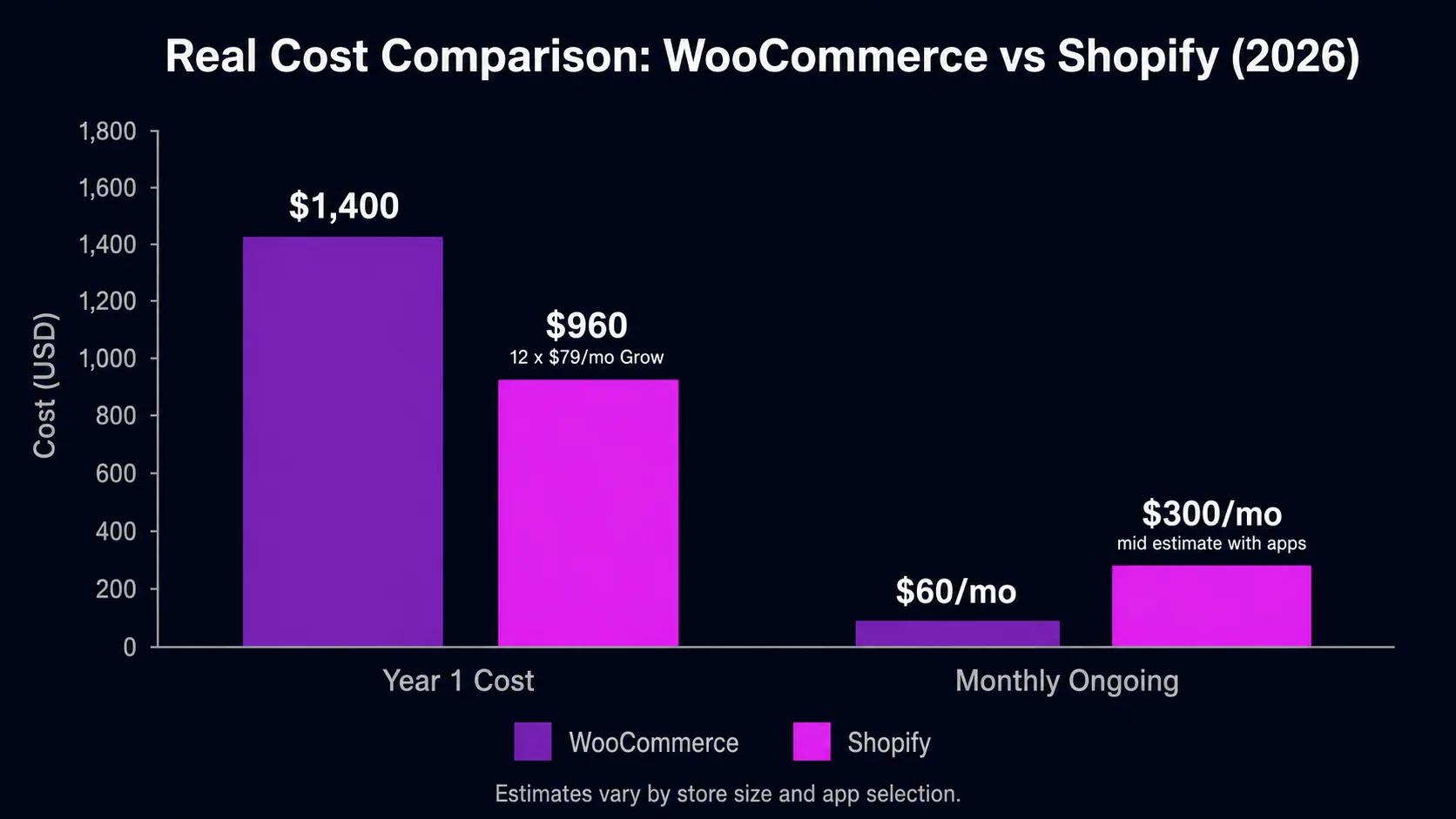
The Real Cost of Each Platform in 2026
Both platforms have a “hidden cost” problem that the marketing pages do not show you. Here is what I see clients actually pay.
Shopify: What You Actually Pay
Shopify’s Basic plan starts at $39/month. That sounds affordable until you add the real costs:
- Transaction fees: If you do not use Shopify Payments, Shopify charges 0.5% to 2% of every sale on top of your payment processor fees. On a $200,000/year store, that is $1,000 to $4,000 gone before you see any of it.
- Apps: Most serious stores run 8 to 15 paid apps. Review tools, loyalty programs, upsell flows, subscription billing, advanced reporting. Budget $150 to $500/month in apps alone.
- Themes: Premium Shopify themes run $300 to $400 as a one-time cost. Custom themes start around $3,000 to $8,000.
- Total mid-market Shopify store: $600 to $1,200/month all-in for a store doing real volume.
WooCommerce: Why “Free” Is a Myth
WooCommerce the plugin is free. But running a WooCommerce store is not:
- Managed WordPress hosting: A store that can handle real traffic needs quality hosting. Kinsta, WP Engine, and Cloudways run $30 to $120/month depending on traffic.
- Premium plugins: Subscription billing, product bundles, advanced shipping rules, and accounting integrations run $500 to $2,000/year in plugin licenses.
- Developer time: WooCommerce gives you more control, but that control has a cost. Plan for 5 to 15 hours of developer time annually just for updates, compatibility checks, and small customizations.
- Total mid-market WooCommerce store: $400 to $900/month when you factor in hosting, plugins, and developer time.
For most mid-size stores, the cost difference is smaller than you think. The decision should come down to which platform does what you need, not which one appears cheaper at first glance.
According to data from Tech Insider, WooCommerce holds 36% to 38% of all e-commerce websites globally, while Shopify sits at 27% to 28%. WooCommerce has more stores by count. Shopify has more high-revenue merchants.
Ease of Setup: Who Gets to Market Faster?
Shopify wins this category without argument. You sign up, pick a theme, add products, connect a payment processor, and you are live. Most first-time store owners can launch a functional Shopify store in a weekend with no developer help.
WooCommerce requires you to handle hosting separately, install WordPress, configure WooCommerce, set up a payment gateway, configure SSL, handle caching and performance, and keep everything updated. None of this is technically difficult if you have done it before, but it is a meaningful barrier if you have not.
If you need to validate a product idea quickly, start on Shopify. You can always migrate later. We have moved clients from Shopify to WooCommerce when their content strategy outgrew what Shopify could support, and the other direction when a WooCommerce store owner wanted to spend less time managing a server.
SEO: Which Platform Ranks Better in 2026?
This is where WooCommerce has a clear structural advantage for content-heavy stores, and where Shopify catches up through execution speed and AI Overview appearances.
Where WooCommerce Wins on SEO
- URL structure: Shopify forces every product into a
/products/path. You cannot remove it. WooCommerce gives you full URL control, including custom taxonomies and flat URL structures. - Blogging: WordPress is, at its core, a publishing platform. The blogging tools, category structure, tag architecture, and internal linking flexibility are far superior to Shopify’s basic blog.
- Technical SEO plugins: Rank Math and Yoast SEO give WooCommerce stores granular control over every meta field, schema type, and crawl directive. Shopify handles the basics automatically, but you lose control over specifics.
- Content marketing at scale: Stores relying on blog content for organic traffic find WooCommerce three to five times more capable for content management than Shopify, per Scandiweb’s 2026 platform comparison.
Where Shopify Wins on SEO
- Core Web Vitals out of the box: Shopify’s hosted infrastructure delivers fast Time to First Byte and passes Core Web Vitals more consistently than a poorly configured WooCommerce host. See our Core Web Vitals guide for what these scores mean for rankings.
- AI Overview appearances in 2026: Google and major AI systems now recognize Shopify as a verified commerce platform. Product pages on Shopify appear in Google AI Overviews and Perplexity recommendation carousels more frequently than equivalent WooCommerce pages, likely because Shopify’s platform-level structured data is consistent and trusted.
- Automatic schema: Shopify generates product schema, breadcrumb schema, and review schema automatically. WooCommerce requires a plugin to achieve the same.
My recommendation: if your store is product-led with a catalogue of 50 to 500 SKUs and minimal blog content, Shopify’s SEO is sufficient. If you are building a content-first brand that uses articles, guides, and comparisons to drive organic traffic, WooCommerce gives you the tools to do it properly. For our SEO optimization work, we have achieved better long-tail rankings for content-heavy WooCommerce stores specifically because of the URL and content structure flexibility.
AI Features and Built-in Tools: Shopify Leads in 2026
This is the most significant gap between the platforms right now, and it is growing.
Shopify Magic, the AI feature umbrella Shopify launched in 2023 and expanded significantly through 2025 and 2026, now covers product description generation, image background removal and editing, customer segmentation, demand forecasting, and personalized shopping recommendations. These are native, no plugin required.
WooCommerce can add similar features through third-party tools like WooCommerce AI extensions, but you pay for each integration separately and the experience is less unified. If AI-native merchandising tools matter to your business, Shopify has a meaningful lead in 2026.
Customization and Extensions
WooCommerce wins on raw customization depth. With access to over 59,000 WordPress plugins and 800 WooCommerce-specific extensions, you can build almost any store functionality you can imagine. Product configurators, rental booking, auction formats, B2B pricing tiers, multi-vendor marketplaces, and custom checkout flows are all achievable.
Shopify’s App Store has over 8,000 apps, which is genuinely sufficient for most stores. But when you need something highly specific or want to modify the checkout page outside of Shopify Plus ($2,300/month), you hit hard limits that WooCommerce simply does not have.
For our Shopify development clients, those hard limits matter less than they appear because most store owners never need that level of customization. For our WordPress and WooCommerce clients, the flexibility is exactly why they chose the platform.
Performance and Core Web Vitals
On a well-configured host with caching and optimized images, WooCommerce and Shopify perform comparably. The difference is in the floor, not the ceiling.
Shopify’s floor is higher because every store runs on Shopify’s infrastructure with built-in CDN delivery. A brand new Shopify store with a good theme will pass Core Web Vitals without any additional configuration.
WooCommerce’s floor is lower because a new store on shared hosting with a heavy page builder and unoptimized images will fail Core Web Vitals badly. The ceiling, though, is just as high as Shopify when you invest in proper hosting, a lightweight theme, and a CDN. I have WooCommerce stores consistently scoring 95+ on PageSpeed Insights for clients who started on bad hosting and moved.
If you cannot manage hosting and performance configuration yourself, this is a genuine argument for Shopify. If you can, or if you work with a developer who can, WooCommerce performance is not a reason to avoid it.
When to Choose Shopify
- You are launching your first store and want to focus on products and marketing, not server management.
- You sell physical products in person as well as online (Shopify POS is the only built-in option).
- Your store has a clean product catalogue with 10 to 500 SKUs and no unusual checkout requirements.
- You want AI merchandising tools without integrating third-party services.
- Speed to market is more important than long-term SEO content strategy.
- You are on Shopify Basic or Shopify plan and plan to use Shopify Payments to avoid transaction fees.
When to Choose WooCommerce
- Your store is built on content marketing, SEO guides, or comparison pages that drive organic traffic.
- You need URL structure control or custom taxonomies for large catalogues.
- You want to avoid transaction fees at any sales volume.
- You need highly specific checkout customization that Shopify Plus would be required for on Shopify.
- You already run a WordPress site and want to add e-commerce without managing a second platform.
- You have a developer relationship and can invest in proper hosting and maintenance.
Already on One Platform and Thinking of Switching?
Switching platforms is a real project, not a weekend task. Shopify to WooCommerce migrations typically take two to four weeks for a mid-size store when done properly: product data export, URL mapping with 301 redirects, theme rebuild, payment gateway setup, and post-launch Search Console monitoring to make sure rankings hold.
The SEO risk of a migration is real but manageable. We covered the full process in our post on redesigning a website without losing SEO rankings. The same principles apply to platform migrations. The key is that every old URL gets a 301 redirect to its new equivalent, and you submit the updated sitemap to Search Console immediately after launch.
If you are considering migrating between Shopify and WooCommerce and want a free scoping call, our e-commerce development team handles both platforms and has done both migration directions for clients.
Final Verdict: Shopify vs WooCommerce in 2026
There is no universally correct answer. The platform that serves you best depends on what your store actually needs.
Choose Shopify if you want speed, simplicity, and built-in AI tools without managing a server. Choose WooCommerce if you want SEO control, content flexibility, and the ability to customize every part of your store without paying Shopify Plus rates.
What I tell most clients: if you are not sure, start on Shopify. It is genuinely easier to migrate from Shopify to WooCommerce later than to manage a complex WooCommerce setup as a first project. But if you know from day one that content marketing is your primary customer acquisition channel, start on WooCommerce and build it right from the beginning.
We build on both platforms and have no preference between them. If you want a free 30-minute call to talk through which one fits your specific store, get in touch at websloop.com/contact.